TikTok Automation – Complete Strategy: Workflows and Tools (−72% Time Spent)
by Sebastian Voppmann
Posting one to three videos on TikTok daily — that’s not a recommendation, that’s the reality for accounts that genuinely want to grow. The TikTok algorithm rewards frequency and consistency more than any other platform. Done manually, that consumes 14 to 16 hours per week: writing scripts, filming, editing, writing captions, researching hashtags, posting, answering comments, monitoring trends. That’s no longer content marketing — that’s a full-time job.
The alternative isn’t lower-quality content. The alternative is a system that automates the repetitive layers while you focus on what really counts: the creative decision, the hook, the moment in front of the camera. Anyone who has built this system runs their TikTok automation in 4 to 5 hours per week — at the same or higher posting frequency.
TikTok operates on different logic from Instagram or YouTube. Reach doesn’t come primarily from your own follower pool — it comes from the algorithm’s For You feed. This feed favors accounts that post regularly and frequently — not accounts that publish perfect videos every three days. That means: anyone who wants to grow on TikTok needs a production system. Creativity alone isn’t enough.
Phase 01 – Automating Content Strategy and Trend Research
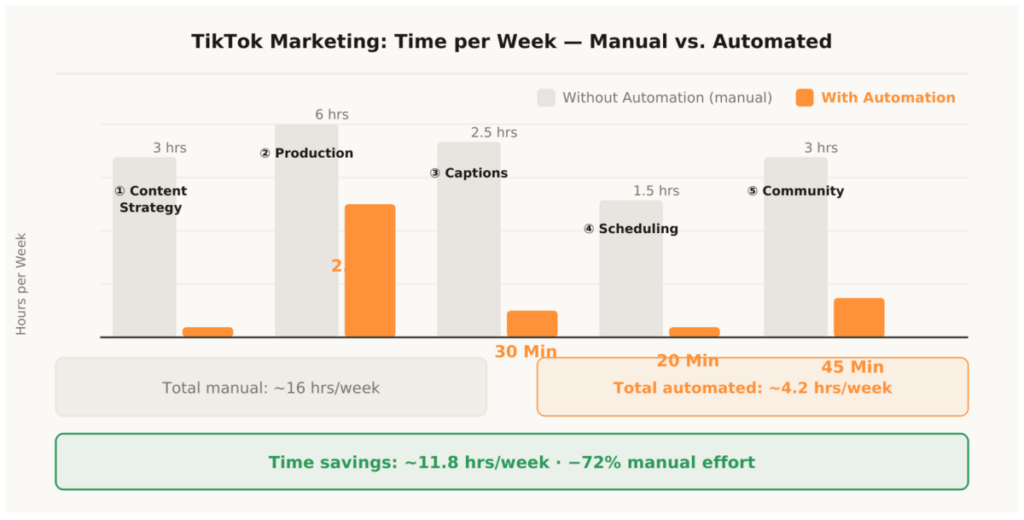
Before: 3 hours per week — Today: 20 minutes per week
The biggest difference between manual TikTok work and automated TikTok work isn’t in the production — it’s in the planning. Anyone who decides each day what to post loses 20–30 minutes daily on a decision that can be made once per week. Add to that trend research: TikTok runs on trends, sounds and hook formats that change weekly. Tracking this manually costs hours.
TikTok penalizes inconsistency harder than any other platform. An account that posts daily for five days and then pauses for three days demonstrably loses algorithmic reach. The For You feed algorithm prioritizes accounts sending a stable posting signal — regardless of how good the individual videos are. This means consistency isn’t an optional nice-to-have, it’s the prerequisite for organic growth on TikTok. And consistency can only be achieved through a system — not through willpower.
1.1 Weekly Script Plan with Claude
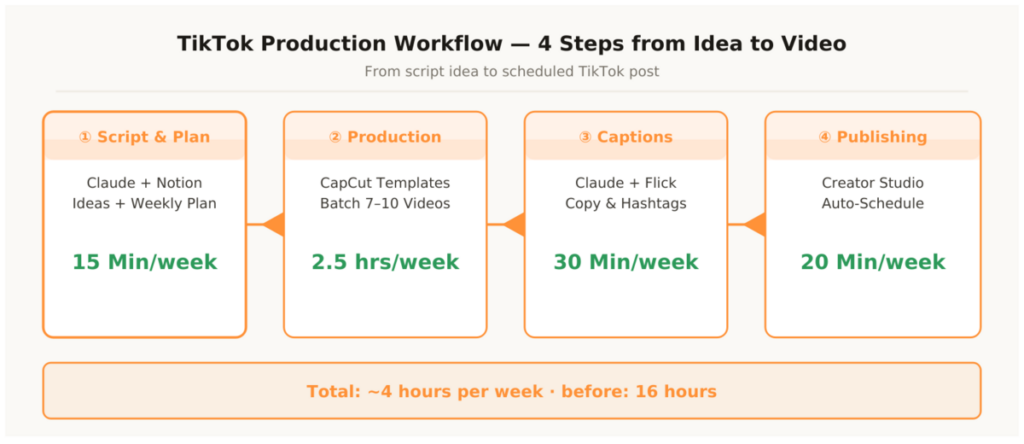
Once a week you feed Claude Pro four inputs: your niche, three to five current trend topics from the TikTok Creative Center, the last three top videos of the channel (title + view numbers), and current questions from your comments. Claude returns: seven to ten script ideas with hook variant, format recommendation (talking head, text-on-screen, tutorial, reaction) and estimated production time. These ideas go directly into your Notion database — the weekly plan is done.
What used to cost 2–3 hours now takes 15 minutes. The key isn’t the prompt itself — it’s the context. A generic “give me TikTok ideas” prompt produces generic ideas. A prompt with your own top-performing videos, current trends in your niche and concrete questions from your community produces ideas already calibrated to your audience.
1.2 Trend Research with the TikTok Creative Center
The TikTok Creative Center is free and shows in real time which hashtags, sounds and video styles are going viral in your region and niche. These aren’t estimates — these are data directly from the algorithm. Every Monday morning, 10 minutes in the Creative Center: which sounds have momentum right now, which hashtags are performing above average, which video formats are getting the widest distribution?
These insights go into the week’s Claude prompt. The result: ideas that not only fit your niche but also work with the current algorithm rather than against it.
1.3 Notion as Content Pipeline
All script ideas, production status and planned upload dates come together in a single Notion database. Status fields: Idea → In Production → Edited → Scheduled → Live. No spreadsheets, no notes, no Slack messages. Anyone working with multiple people — editor, camera operator, social media manager — can share the status overview in real time. One look at the board shows immediately where the bottleneck is.
The Notion database isn’t just a to-do board — it’s the data foundation for the entire workflow. Each entry contains: script idea, chosen format, hashtag set (from Flick), planned caption (from Claude), production date, upload date and the status link to the finished video. This structure makes it possible to fill the weekly plan in 15 minutes and never need to ask again — neither yourself nor the team.
Every Monday, 15 minutes: open TikTok Creative Center, note three current trend sounds and three trend topics, fill the Claude prompt, generate seven script ideas, enter in Notion. The weekly plan is done. Anyone who runs this ritual for four weeks notices how the daily micro-decisions disappear — and how much mental energy that frees up.
Phase 02 – Accelerating Video Production
Before: 6 hours per week — Today: 2.5 hours per week
Video production is the biggest time block in the TikTok workflow. Editing, adding auto-captions, syncing music, setting transitions, inserting text overlays — done manually, a single 60-second video costs 45 to 90 minutes. With the right system you get to 12 to 18 minutes per video. The difference isn’t about cutting corners on quality — it’s about templates, batching and AI assistance.
2.1 Building CapCut Brand Templates
CapCut is the standard tool for TikTok production — free, mobile and desktop, directly integrated into TikTok upload. The key isn’t CapCut itself — it’s the template infrastructure. Three to four templates cover 90 percent of all videos: talking-head template with subtitle style, color and font; text-on-screen template for listicle formats; tutorial template with screenshare overlay; and reaction template.
These templates are set up once in CapCut — fonts, colors, music track (royalty-free), intro clip and outro. Every new video starts with “duplicate template.” No setup from scratch, no color discussion, no font decision. Just insert content, done.
2.2 Auto-Captions and AI Editing in CapCut
CapCut generates captions automatically with one click — speech-to-text, positioning and styling all predefined in the template. What used to take 15 minutes of manual typing takes 20 seconds. Accuracy is over 90 percent — only obvious errors need correcting.
Added to that is the auto-beat-sync function: CapCut automatically synchronizes cuts to the beat of the chosen music track. No manual searching for the right cut point. This saves 10 to 15 minutes of pure handwork on a 60-second video with music.
2.3 Opus Clip for Long-Form Repurposing
Anyone with YouTube videos, podcast episodes or webinar recordings has finished TikTok material — without knowing it. Opus Clip analyzes the entire video, identifies the most engaging segments based on speech analysis and view-rate patterns, independently cuts to 45–60 seconds and adds subtitles and portrait-format reframing. From a 20-minute YouTube video, three to five finished TikToks are produced — without any manual editing.
2.4 Batching as a Production Multiplier
The secret behind every TikTok account that posts daily is batching. Not producing daily — producing all videos in one block once a week. A Wednesday production block of two and a half hours delivers seven to ten videos. Energy stays constant because you don’t have to switch into production mode every day. The studio setup stands once — lights, camera, teleprompter — and isn’t taken down again.
Batching works particularly well on TikTok because many successful formats don’t require elaborate production. Text-on-screen videos, talking-head clips with subtitles and tutorial screenshares can each be produced in ten to fifteen minutes — when the templates are in place. Anyone filming and editing seven videos in one block is in the production flow by the third video and needs significantly less time for the remaining ones than for the first. Task-switching costs are eliminated, overall productivity rises.
Phase 03 – Automating Captions, Hooks and Hashtags
Before: 2.5 hours per week — Today: 30 minutes per week
TikTok captions are underestimated. They look short — but they’re algorithmically relevant because TikTok uses the caption text to classify the video’s content. Anyone writing captions with the right keyword focus helps the algorithm serve the video to the right audience. Anyone treating captions as an afterthought is giving away reach.
3.1 Caption System with Claude Templates
The foundation is — just like the Instagram system — a brand voice document. One page: tone, forbidden words, three example hooks from top videos, typical CTA phrasings. This document goes into every caption prompt.
Three saved caption templates cover all formats: standard video with CTA, trend reaction with hook, and tutorial with step-by-step structure. The process: take the script from Notion, open the matching template, insert the script, generate the caption, finalize in 60 seconds. Seven captions in one session — 20 minutes total.
3.2 Hashtag Strategy with Flick and TikTok Creative Center
TikTok hashtags work differently from Instagram hashtags. It’s not about stacking as many relevant tags as possible — it’s about three to five precise tags that correctly categorize the video and reach the target audience. Too many tags, too large tags, too generic tags: all of these reduce reach rather than increasing it.
Flick delivers hashtag clusters by reach and niche relevance. Three to four clusters for core topics — for each post, select the matching cluster, done. The TikTok Creative Center additionally shows which hashtags are gaining momentum right now. Weekly cluster update: 10 minutes every Monday in the Creative Center, update clusters in Flick. Current and automated.
A practical note on the hook in the caption: TikTok only shows the first one to two lines of the caption before the user has to tap “more.” The first sentence of the caption is therefore the only sentence most users see. It has to either trigger curiosity, make a concrete statement or directly prompt action. The Claude prompt should explicitly instruct to put the hook in the first sentence — not after an introduction. Anyone who writes this once into their brand voice document gets it right permanently.
- Write brand voice document (tone, forbidden words, 3 example hooks, 3 example CTAs)
- Save three caption templates in Claude (Standard, Trend Reaction, Tutorial)
- Create Flick account, build three hashtag clusters for core topics
- Set up TikTok Creative Center as weekly trend-check source
- Extend Notion database with caption and hashtag columns
- First batch: generate and review seven captions in one session
Phase 04 – Automating Scheduling and Publishing
Before: 1.5 hours per week — Today: 20 minutes per week
TikTok has a native, free scheduling tool built into Creator Studio. No third party needed for the core function: upload videos, set date and time, insert caption and hashtags, schedule. Creator Studio handles the upload automatically — even while you sleep.
4.1 Setting Up TikTok Creator Studio
Creator Studio is available directly in the TikTok Business Center. Videos can be scheduled up to ten days in advance. Anyone running the Wednesday production block consistently schedules all seven videos for the coming week the same evening — including captions and hashtags from Notion. That takes 15–20 minutes. The week then runs completely automatically.
4.2 Metricool for Multi-Account and Best-Time Analysis
Metricool extends Creator Studio with two decisive features: multi-account management and best-time analysis. Anyone managing multiple TikTok accounts or simultaneously covering Instagram and YouTube needs a central dashboard. Metricool delivers that — including optimal posting times for each account based on its own follower activity data.
The weekly 15-minute analytics review in Metricool: which videos have the best completion rate? Which hooks lead to the most saves? Which formats get the widest distribution? These three metrics determine the next Monday planning prompt for Claude. The workflow improves automatically — week by week, data-driven.
Completion rate is the most important metric on TikTok — more important than likes, more important than follower growth. A video with 80 percent completion rate at 500 views signals more quality to the algorithm than a video with 20 percent completion rate at 5,000 views. Anyone who systematically improves their completion rate through better hooks and shorter, denser videos gets rewarded by the algorithm — with more reach, more follows and more organic visibility. Metricool makes this metric visible without having to check TikTok Studio every day.
Phase 05 – Scaling Community Management
Before: 3 hours per week — Today: 45 minutes per week
Community management on TikTok is different from Instagram. Comments are publicly visible and are counted by the algorithm as an engagement signal — the more meaningful comments a video receives, the further the algorithm distributes it. That means comments aren’t just community maintenance, they’re reach levers.
What can be automated: standard DM replies to frequent requests, comment-to-DM flows for content actions, and automatic distribution to additional platforms. What stays manual: genuine replies to genuine comments, personal reactions to trends, substantive DM conversations.
5.1 ManyChat for TikTok: Comment-to-DM Flows
ManyChat supports TikTok as a platform. A keyword trigger works identically to Instagram: anyone who writes a defined keyword in a comment automatically gets a DM with the promised content. This simultaneously increases comment count — a direct algorithm signal — and collects leads directly in the DM inbox.
One flow is enough to start. Define the keyword, write the DM text, insert the link, activate the flow. 30–45 minutes setup — then it runs 24 hours, 7 days a week.
5.2 Repurpose.io for Automatic Cross-Distribution
Publishing a produced TikTok video only on TikTok is the most inefficient way to use it. Repurpose.io connects TikTok directly with Instagram Reels, YouTube Shorts, Pinterest and LinkedIn. One upload — four platforms — zero manual effort after setup.
Important note: for Instagram and YouTube, always use the CapCut export version without the TikTok watermark. CapCut exports without a watermark when you load directly from CapCut into the Repurpose.io system instead of downloading from TikTok. This one step takes 30 seconds and prevents Instagram and YouTube from distributing the video less widely because of the TikTok logo.
The potential of cross-distribution is regularly underestimated. A TikTok video that generates 500 views on TikTok can bring 2,000 views on YouTube Shorts and another 1,500 on Instagram Reels — without a single additional production step. Anyone covering four platforms simultaneously multiplies their total reach without investing proportionally more time. Repurpose.io is the technical lever behind this — once set up, distribution runs fully automatically.
ManyChat flows and Creator Studio scheduling are fully rule-compliant. What violates TikTok’s terms of service and risks account bans — often without warning:
- Automated following and unfollowing of other accounts
- Automatic liking of other videos at scale
- Mass DMs without user trigger
- Buying engagement (followers, likes, comments)
The Complete Tool Stack
This list is updated regularly when new tools are integrated into the workflow or existing tools are replaced. All tools were tested in real use over several months. Cost, simplicity and time savings are personal experience values.
Content Strategy & Planning
1. Claude Pro
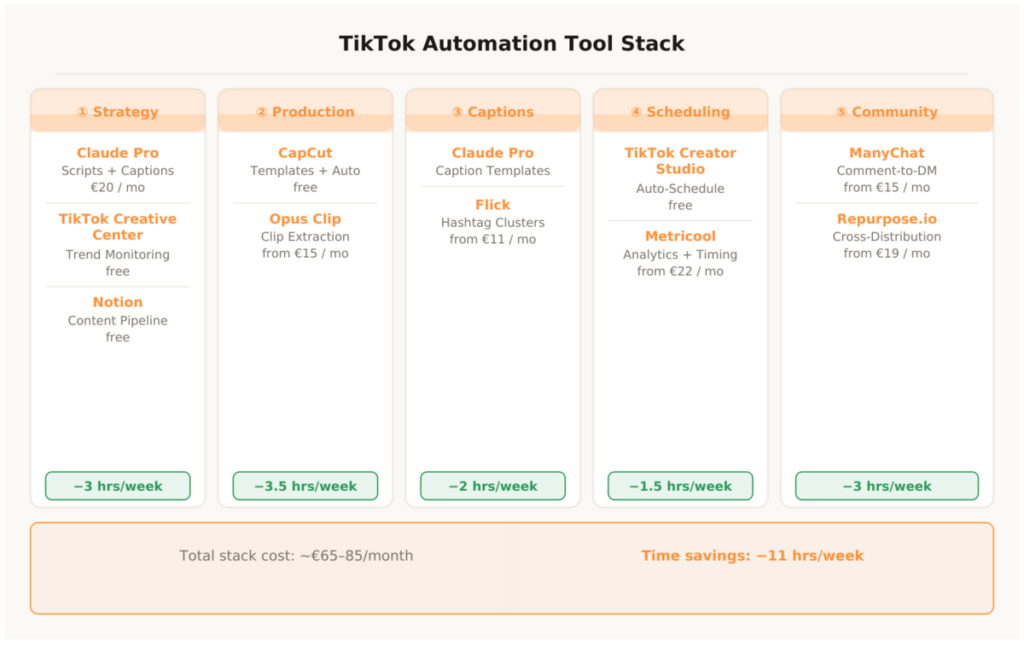
Script ideas, hook variants and caption generation based on the brand voice document. The AI core of the entire system. Cost: €20/month. Time savings: 2.5 hours per week. Setup: moderate. Bottom line: Indispensable — no scalable script and caption system without Claude.
2. TikTok Creative Center
Trend monitoring for sounds, hashtags and video formats directly from the TikTok algorithm. Shows in real time what’s going viral in your niche and region. Cost: free. Time savings: 1 hour per week. Setup: very easy. Bottom line: Essential source for weekly planning — no other source has better data.
3. Notion
Central content pipeline with status tracking, script archive and hashtag library. Connects all phases of the workflow. Cost: free. Time savings: 30 minutes per week. Setup: very easy. Bottom line: Foundation of the entire production system.
Video Production
4. CapCut
Brand templates, auto-captions, beat sync and direct TikTok upload — all in one free tool. The only production tool most TikTok accounts need. Cost: free. Time savings: 3.5 hours per week. Setup: very easy. Bottom line: The first tool everyone should set up immediately — biggest time savings per setup effort.
5. Opus Clip
AI clip extraction from long-form videos — analyzes, cuts to 45–60 seconds and adds subtitles and reframing. Only relevant if you produce YouTube videos, podcasts or webinars. Cost: from €15/month. Time savings: 2 hours per week (long-form content only). Setup: very easy. Bottom line: Powerful for repurposing, unnecessary without long-form content.
Captions & Hashtags
6. Flick
Hashtag clusters by reach, competition and niche relevance for TikTok. Three to four clusters set up once — updated weekly in 10 minutes. Cost: from €11/month. Time savings: 45 minutes per week. Setup: very easy. Bottom line: Biggest time savings per euro in the entire stack.
Scheduling & Analytics
7. TikTok Creator Studio
Native, free scheduling tool directly from TikTok — up to ten days in advance, without any third party. The complete solution for one account. Cost: free. Time savings: 1 hour per week. Setup: very easy. Bottom line: No reason for a paid scheduling tool as long as you’re running just one account.
8. Metricool
Multi-account dashboard, best-time analysis based on your own follower data and weekly performance review. Only relevant from two accounts or platforms. Cost: free / from €22/month. Time savings: 30 minutes per week. Setup: very easy. Bottom line: Closes the loop between production and optimization.
Community & Distribution
9. ManyChat
Comment-to-DM flows for TikTok — one keyword trigger collects leads and simultaneously boosts comment engagement. Fully rule-compliant. Cost: from €15/month. Time savings: 1.5 hours per week. Setup: moderate. Bottom line: Biggest lever for passive lead generation on TikTok.
10. Repurpose.io
Automatic cross-posting to Instagram Reels, YouTube Shorts, Pinterest and LinkedIn after the TikTok upload. One video — four platforms — zero manual effort. Cost: from €19/month. Time savings: 1 hour per week. Setup: very easy. Bottom line: Essential as soon as you’re active on more than one platform.
Total cost of the entry configuration: approx. €65–85/month. The minimum version — Claude Pro, CapCut, Flick, Creator Studio — costs €31/month and covers the most important time savings. At an hourly rate of €50, the full stack is already covered by the saved hours in the first week.
TikTok Automation – The Most Important Questions
Do scheduling tools violate TikTok’s terms of service?
No — as long as you use certified tools. Later, Metricool and the native Creator Studio are officially approved by TikTok as API partners. What violates the terms: automated following and unfollowing, automatic liking of other posts, mass DMs without user trigger and buying engagement. None of these elements are part of the system described here.
How many videos per day are realistic with this system?
One to two videos daily are achievable with the batch system without excessive effort. For three videos daily you need additional content formats with shorter production time — for example pure text-on-screen videos or short reaction clips. The decisive factor isn’t the system — it’s raw material availability: enough footage for the weekly batch.
Does the system work for B2B accounts?
Yes — TikTok has stopped being a pure consumer platform. B2B creators in niches like marketing, finance, HR and legal are growing fast because competition there is still low. The tool list stays identical. What changes: the Claude script templates need to be calibrated for professional audiences, and the hashtag clusters target technical terms rather than lifestyle keywords.
What does the complete stack cost per month?
The entry configuration is €65–85/month: Claude Pro €20, CapCut free, Flick €11, Creator Studio free, ManyChat €15, Repurpose.io €19, optional Metricool €22. The minimum version — Claude Pro, CapCut, Flick, Creator Studio — costs €31/month. At an hourly rate of €50, the full stack is already covered by the saved hours in the first week.
How long does the initial build take?
Realistically four to six hours: creating CapCut templates (1.5–2 hours), writing the brand voice document and Claude prompts (1 hour), setting up Creator Studio and Metricool (30 minutes), creating Flick clusters (45 minutes), setting up the ManyChat flow (1–1.5 hours), connecting Repurpose.io (30 minutes). Recommendation: staged rollout, one phase per week.
Which tool delivers the fastest ROI?
CapCut templates. Video production is the biggest time block in manual TikTok work — and templates cut this effort in half immediately. Free, shallow learning curve, immediately noticeable savings from the first use. The second tool with fast ROI is Claude Pro for the caption system: seven captions in 20 minutes instead of 2.5 hours. Together these two tools cover the core automation that makes TikTok scalable — before you need any paid scheduling or distribution tool.
This article is updated regularly. Every time new tools are integrated into the workflow or existing tools are replaced, it flows directly in here.