
Business Automation – Complete Strategy for SMEs: Systems, Tools and Workflows per Business Area
by Sebastian Voppmann
Anyone running a business knows the problem: most of your time doesn’t go into what makes the business grow — it goes into what keeps it running. Creating invoices, answering applicant emails, writing follow-up messages, updating ticket statuses, compiling reports. Tasks that are necessary — but generate no strategic value.
Business automation is the answer. Not as an abstract idea, but as a concrete system: which area of the business produces which repetitive tasks — and which tools, workflows and AI solutions take over those tasks reliably and at scale?
This article is written for SMEs that have budget and genuinely want to scale. No “start with a free tool and see how it goes” — instead, a complete look at all six core areas of a business, with concrete tool recommendations, real workflow examples and clear statements about what automation delivers and what it doesn’t replace.
The six areas: Marketing, Sales, Finance & Accounting, HR & Recruiting, Customer Service/Support, and Product/E-Commerce. Each area has its own automation levers — and together they make up a business that produces more output with less manual effort.
What Business Automation Means for SMEs
Business automation in the SME context doesn’t mean replacing employees. It means freeing employees from tasks that require no creativity, no judgment and no genuine human decision — so they can focus on what actually contributes to business growth.
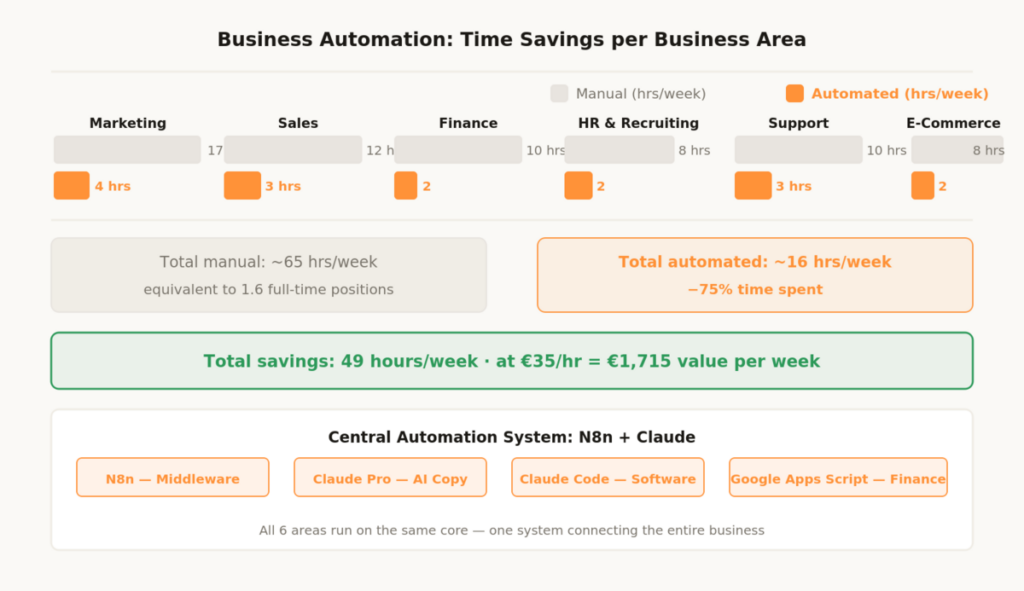
A mid-sized company with 20 employees typically spends over 300 hours per week on repetitive, rule-based tasks — email handling, data transfer between systems, manual reports, standard communications. Conservatively, 40 to 50 percent of that is automatable. That equals 6 to 8 full-time positions that don’t need to be filled once the system is in place — or capacity that can be reinvested into growth.
The ground rule remains the same as with any automation: automate what already works manually. A process that’s broken manually will just break faster with automation. The prerequisite for good automation is always a understood, documented process — then the system.
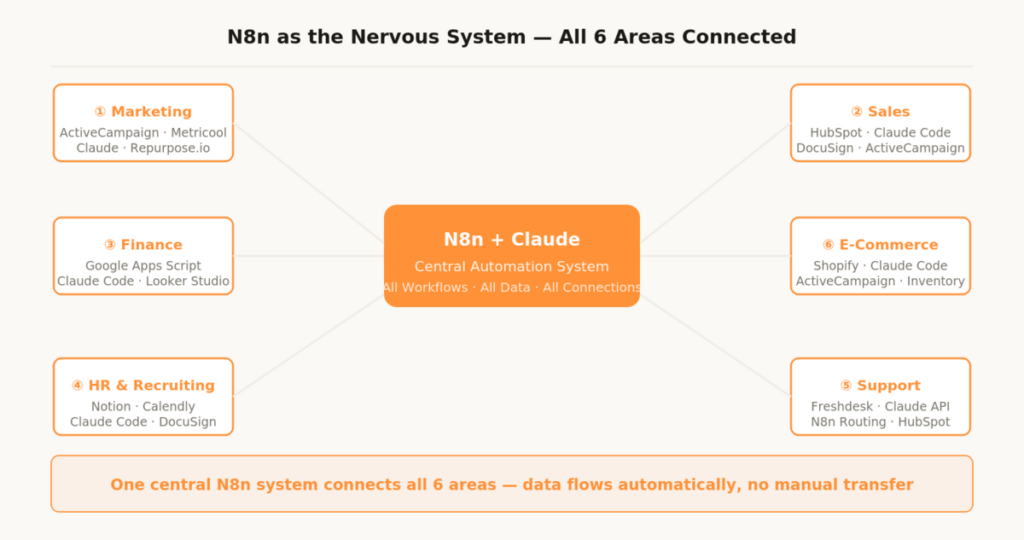
N8n is the central automation middleware in this stack. Self-hosted on a VPS (around €10–20/month) or as N8n Cloud (from €20/month) — N8n connects all tools, automates data flows and builds workflows without coding knowledge. For more complex technical solutions — custom software tools, landing pages, analytics dashboards, custom scripts — Claude Code comes into play: the AI coding assistant that writes complete applications and automation scripts without requiring a developer.
Area 01 – Marketing Automation
Marketing is the area where automation is most tangible for most SMEs and delivers the fastest ROI. Email sequences run through ActiveCampaign or Klaviyo without any manual effort: welcome sequence, lead nurturing, re-engagement. Social media content is batch-produced and scheduled across all platforms via Metricool — no need to open the app every day.
Video content for YouTube, Instagram Reels and TikTok runs through platform-specific automation stacks with Claude for scripts and captions, CapCut for video production and Repurpose.io for cross-platform distribution. SEO content is produced through a Claude-powered workflow: keyword from Ahrefs, brief in Claude, first draft in Claude, on-page check in Yoast, distribution across all channels automatically via N8n.
N8n connects all marketing automation tools into one system: new lead in form → automatically into ActiveCampaign, HubSpot and Slack notification. New blog post published → automatic newsletter teaser, social media posts on all channels, internal Slack notification. Paid ads run on Smart Bidding and Advantage+ — manual optimization work reduces to weekly creative reviews. The complete marketing automation strategy — from email through CRM to social media — is documented in the article Marketing Automation – Complete Strategy: Systems, Tools and Workflows (−80% manual effort).
1.1 Social Media Automation in Detail
For the three largest video platforms, there is a fully documented automation stack for each. YouTube: from 22 hours down to under 4 hours per video through AI scripting, edit templates and automated N8n upload workflow — described in detail in the article YouTube Automation – Complete Strategy: Tools & Workflows (−87% time savings). Instagram: from 17 hours down to under 4 hours per week through Canva templates, Claude caption system and ManyChat flows — documented in the article Instagram Automation – Complete Strategy: Workflows and Tools (−75% time spent). TikTok: daily posting in 4 to 5 hours per week through CapCut batch production and Creator Studio scheduling — fully explained in the article TikTok Automation – Complete Strategy: Workflows and Tools (−72% time spent).
Area 02 – Sales Automation
Sales is the area where automation frees up the most time — without replacing the human element that actually closes deals. A sales rep who spends three hours a day on CRM data maintenance, follow-up timing and proposal creation doesn’t have those three hours for real sales conversations. A well-configured automation system takes exactly those three hours off their plate.
2.1 CRM Automation with HubSpot
HubSpot is the CRM of choice for automation-focused SMEs — not because it’s the cheapest, but because it brings the most comprehensive automation ecosystem. Lead scoring runs automatically based on page visits, email opens, demo requests and form submissions. Once a lead reaches a defined score threshold, HubSpot automatically triggers a sales notification, a personalized follow-up and sets a task in the pipeline.
Pipeline stages automatically trigger defined actions: proposal sent → automatic reminder email after 48 hours without reply. Deal won → automatic onboarding sequence starts immediately. Deal lost → automatic re-engagement sequence starts after 30 days. No lead falls through the cracks — because the system tracks every track without gaps, not a salesperson’s memory.
2.2 Proposal Generation with Claude Code
Writing proposals manually is expensive — every hour a senior salesperson spends on proposal templates is an hour less for real conversations. Claude Code solves this: store a standardized proposal template once, pass in customer data and deal parameters, finished proposal generated as PDF in under two minutes.
N8n handles the handoff completely: deal reaches “Proposal” stage in HubSpot CRM → N8n triggers Claude Code with the relevant deal data (customer name, services, prices, term) → proposal is generated and automatically saved as a draft in the CRM, simultaneously sent by email to the salesperson for approval. The salesperson reviews, confirms with one click, the proposal goes to the customer. What used to take 45 minutes now takes five.
2.3 Sales Sequences and Follow-up Automation
Cold outreach sequences — five to seven emails over three weeks — run automatically through ActiveCampaign or directly from HubSpot. Claude writes the templates based on the brand voice document, N8n personalizes them with CRM data. The combination of AI copy and automated sending turns one salesperson into ten — effectively, without quality loss, without extra effort.
Particularly powerful: automatic re-engagement sequences for leads inactive for 90 days. A salesperson would never manually reactivate these leads — too many, too little time. The automation tools handle it systematically, for every lead, every day.
The single most powerful automation in sales isn’t a CRM feature — it’s an N8n workflow that connects all systems: website form → HubSpot → ActiveCampaign → Slack. When a new lead comes in, the CRM, the salesperson and the marketing system all know simultaneously — and each system acts automatically. This workflow takes under two hours to build in N8n and runs permanently afterwards.
Area 03 – Finance and Accounting
Finance and accounting is the area where automation is most underestimated in most SMEs. Manual invoices, manual payment tracking, monthly reports by copy-paste from multiple sources — that’s five to ten hours per week that generate zero value. At the same time, finance automation is technically more demanding than other areas — what used to require developer resources, Claude Code now handles in a fraction of the time.
3.1 Invoice Automation with Google Apps Script and Claude Code
We developed a solution for our own finance automation based on Google Apps Script that automatically generates invoices, tracks incoming payments and creates monthly reports directly from Google Sheets — without expensive enterprise accounting software for standard processes. Claude Code developed and iterated the core scripts.
The setup is directly replicable: Google Sheets as the data layer for customer data, services and prices. Google Apps Script as the automation layer — automatically generates an invoice as a Google Doc when an order is placed, converts it to PDF, sends it via Gmail directly to the customer and logs the outstanding amount in the payment tracker. Claude Code writes and optimizes these scripts on demand — an example prompt: “Write me a Google Apps Script that automatically generates an invoice as PDF from this Sheets table and sends it via Gmail when column F says ‘Create invoice’.” The finished script including error handling comes back in under five minutes.
3.2 Automating Payment Reminders with N8n
Manually following up on unpaid invoices takes time and is uncomfortable. N8n solves this completely: daily check of all open invoices from the Google Sheets tracker → invoice overdue by 7 days → automatic friendly reminder email → overdue by 14 days → second reminder with a firmer tone → overdue by 30 days → escalation email and Slack notification to the responsible person.
This workflow runs fully automatically — seven days a week, even when the team is on holiday. No manual monitoring, no forgotten follow-ups, no invoices disappearing into the system because no one had time to chase them.
3.3 Automating Financial Reporting
Monthly financial reports — revenue, open items, costs by category, cashflow overview — are replaced by a Looker Studio dashboard that feeds directly from Google Sheets and the payment tracker and updates in real time. N8n automatically sends a summary of the key metrics by email and Slack every Monday at 8am — without anyone opening a report.
For specific requirements — a custom dashboard for the accountant, automated cost center reporting, a cashflow forecast based on open orders — Claude Code writes the required scripts in hours rather than weeks. This eliminates the need in most cases to engage expensive external developers for standard finance automation.
Area 04 – HR and Recruiting
Recruiting and HR are often the least efficient area in mid-sized companies — not because the people do poor work, but because the processes were never optimized for efficiency. Manually confirming every application, coordinating interviews, creating contracts from Word templates, sending onboarding checklists by email. All of this is automatable — and once automated, it’s also more consistent than the manual version.
4.1 Automating the Application Workflow
N8n monitors incoming applications on the careers email or application form. New application received → automatic acknowledgment to the applicant, application transferred to a structured Notion board, Slack notification to the responsible hiring manager, automatic pre-qualification based on defined must-have criteria (location, years of experience, language skills).
Claude reads the application documents and creates a structured summary: core competencies, years of experience, notable strengths, potential gaps — all in a uniform format that reduces the hiring manager’s reading time from twenty minutes to two. What used to be a stack of unstructured PDFs is now a clear Notion board with pre-qualified, summarized candidates.
4.2 Interview Coordination and Contract Generation
Calendly handles interview coordination completely: application passes pre-qualification → automatic booking link to the interviewer’s calendar. No more email ping-pong, no manual coordination of availability. The candidate books themselves, the interviewer gets an automatic calendar invite.
Contract generation runs through Claude Code: store a master contract template once, pass in employee data. Claude Code generates a fully completed contract draft from the template and specific parameters (start date, salary, position, probationary period, vacation days) in seconds. N8n passes it directly to DocuSign — the contract is signed digitally, without a single manual input. What used to take 30 minutes now takes three.
4.3 Onboarding Automation
Sending onboarding checklists by email is not good enough in 2026. A structured onboarding workflow runs through Notion, N8n and Slack: contract signed → N8n automatically starts the onboarding workflow → Notion board for the new employee is created, all relevant documents are prepared and shared, the buddy is notified via Slack, a weekly check-in email sequence over four weeks starts automatically.
Onboarding is consistent from day one — whether it’s the first or the fiftieth onboarding of the year. Claude writes the personalized welcome emails based on a short input: name, position, start date, team. They sound personal — because they’re tailored to the specific person, not a generic role.
- Month 1: Sales — set up HubSpot, define lead scoring, build N8n-CRM connection
- Month 2: Marketing — email sequences, social media scheduling, N8n as marketing hub
- Month 3: Finance — Google Apps Script with Claude Code, payment tracking, N8n dunning
- Month 4: Support — set up Freshdesk, integrate Claude chatbot, ticket routing in N8n
- Month 5: HR — application workflow, contract generation with Claude Code, onboarding automation
- Month 6: E-Commerce/Product — order workflow, inventory tracking, customer lifecycle sequences
Area 05 – Customer Service and Support
Customer service automation is the area where most companies stop too early. A FAQ chatbot is not a customer service automation system — it’s the first of ten possible automation steps. A complete support automation system covers first-level requests, ticket routing, escalation workflows and proactive customer success.
5.1 First-Level Support with Claude API
The Claude API can be embedded as intelligent first-level support directly on the website or in the customer portal. Claude Code builds the frontend — a chat interface that matches the corporate identity — and the backend integration that connects Claude to the company’s knowledge base. The result is not a rule-based FAQ bot that only responds to exact phrasings. Claude understands context, answers questions even when they’re worded differently from the FAQ, and can take in complex support requests in a structured way and forward them.
Anyone who feeds their knowledge base, product documentation and most common support cases as context into the Claude prompt gets a support agent that answers without human escalation in 70 to 80 percent of cases. The remaining 20 to 30 percent — complex cases, complaints, technical exceptions — are automatically escalated to the right employee.
5.2 Ticket Routing and Escalation Workflows
N8n monitors all incoming support requests — by email, form, chat — and classifies them automatically: urgency, topic area, customer type (new customer, existing customer, VIP). Based on this classification, the ticket is automatically routed to the right employee, with a defined priority and automatic escalation if it’s not handled within the SLA window.
Freshdesk as the helpdesk platform, N8n as the routing layer behind it — this system operates without any manual dispatch work. No morning inbox sorting, no estimating priorities, no forgotten tickets. The system decides rule-based — consistently, fast, scalably.
5.3 Proactive Customer Success
The reactive support mode — waiting until the customer writes — is the most expensive way to run support. Automated proactive support is cheaper and prevents churn before it happens: N8n monitors defined triggers (customer has never used Feature X, usage frequency has decreased over the last 14 days, contract expires in 30 days) and automatically triggers personalized outreach emails, help content or tasks for the customer success team.
Claude writes these outreach emails based on customer data from the CRM — personalized to the specific situation, not generic. A customer who has never used Feature X gets an email that explains how Feature X solves their specific problem — not a general newsletter campaign.
Area 06 – Product and E-Commerce Automation
For companies with physical or digital products, automation in operations and e-commerce is the area with the highest scaling potential — and at the same time, the one that collapses fastest without a system. What works manually at ten orders a day is not manageable at a hundred orders.
6.1 Order Workflow and Fulfillment
N8n is the central automation layer between the shop system (Shopify, WooCommerce), warehouse/fulfillment provider, CRM and accounting. New order received → automatically forwarded to the warehouse, order confirmation to the customer, invoice draft created in the Google Sheets system, customer data transferred to HubSpot CRM, inventory updated.
This workflow runs without a single manual step — from order to invoice. What costs one hour manually at ten orders a day runs through the same N8n system at a thousand orders a day without additional effort. That’s the scaling effect of automation: effort doesn’t grow proportionally with volume.
6.2 Inventory and Reorder Automation
N8n monitors inventory levels in real time and automatically triggers reorders when defined minimum stock levels are breached — with automatic order confirmation to the supplier by email, Slack notification to purchasing and update in the accounting system. No more out-of-stock from forgotten manual checks. No excess inventory from reacting too late to sales trends.
6.3 Digital Products and Landing Pages with Claude Code
For digital products — online courses, software tools, templates, SaaS products — Claude Code is a fundamental lever. Landing pages that used to require a designer and a developer, Claude Code creates in under an hour: a complete, responsive HTML/CSS page, optimized for conversions, ready to copy into WordPress or direct hosting.
Beyond that, Claude Code develops complete micro-SaaS products, internal tools and automation scripts. An internal reporting dashboard that aggregates and visualizes sales figures from multiple sources was built with Claude Code in one day — what would have taken two to three weeks with traditional development. This fundamentally changes the product development dynamic: ideas that used to fail due to developer capacity are now buildable internally.
6.4 Customer Lifecycle in E-Commerce
Automated email sequences for every stage of the customer lifecycle: post-purchase sequence (thank you, product tips, upsell after seven days), abandoned cart sequence (three emails over 24 hours), win-back sequence (30 days after last purchase), loyalty sequence (from the third purchase onwards). Each of these sequences runs automatically through ActiveCampaign — and together they cover the entire customer lifecycle in N8n, without manual work.
Claude writes all templates based on the brand voice document. The result sounds consistently like the brand — whether it’s the first or the thousandth automatically sent email.
The Complete Business Automation Stack
This stack is designed for SMEs with serious scaling ambitions — no minimal compromise, but the complete system for all six business areas.
Automation Middleware & AI Core
1. N8n
The nervous system of the entire business automation stack. Connects all tools, automates all data flows and builds complex workflows without coding knowledge. Self-hosted on a VPS for free, N8n Cloud from €20/month. Time savings: 10–20 hours per week company-wide. Setup: moderate. Bottom line: The single most important building block — without N8n, no cross-functional automation system is possible.
2. Claude Pro + Claude Code
Claude Pro for all copy, briefs, emails, proposals and analysis. Claude Code for scripts, landing pages, internal tools, custom dashboards and automation solutions without an external developer. Cost: €20/month + API usage. Time savings: 15–25 hours per week across channels. Setup: easy to moderate. Bottom line: The AI core for the entire operation — from copy to complete software.
Sales & CRM
3. HubSpot
CRM, pipeline automation, lead scoring and deal tracking. Free plan fully usable to get started. Cost: free / from €45/month. Time savings: 8 hours per week. Setup: easy. Bottom line: Best CRM for automation-focused SMEs — free plan covers up to 10 active deals simultaneously.
4. DocuSign
E-signature for contracts, proposals and HR documents — directly integrated in N8n. Cost: from €25/month. Time savings: 2 hours per week. Setup: easy. Bottom line: Paperless signing in under five minutes per document.
Finance & Accounting
5. Google Workspace + Apps Script
Invoice generation, payment tracking and automatic reports based on Google Sheets — developed with Claude Code. The most affordable solution for structured finance automation without enterprise software. Cost: from €6/user/month. Time savings: 5–8 hours per week. Setup: technical (Claude Code handles the script development). Bottom line: Our own solution — replicable for any SME in one day.
6. Looker Studio
Real-time finance dashboard from all connected data sources — no more manual reporting. Cost: free. Time savings: 2 hours per week. Setup: moderate. Bottom line: Set it up once, use it permanently — reporting runs automatically.
HR & Recruiting
7. Notion
Application tracking, onboarding boards and central HR documentation. Cost: free / from €10/user/month. Time savings: 3 hours per week. Setup: very easy. Bottom line: The foundation of the entire HR workflow — connects all recruiting and onboarding steps.
8. Calendly
Automatic interview coordination without email ping-pong — candidate books directly in the interviewer’s calendar. Cost: from €8/month. Time savings: 1–2 hours per week. Setup: very easy. Bottom line: An instant upgrade for any recruiting team.
Customer Service & Support
9. Freshdesk
Helpdesk platform with automatic ticket routing, SLA management and N8n integration. Cost: free / from €15/agent/month. Time savings: 5–7 hours per week. Setup: easy. Bottom line: Scales from one agent to a full team without process changes.
Product & E-Commerce
10. Shopify
Shop system as the central trigger for all downstream N8n workflows — order → warehouse → invoice → CRM fully automated. Cost: from €29/month. Time savings: 4–6 hours per week. Setup: easy. Bottom line: The order workflow runs fully automatically from the very first order.
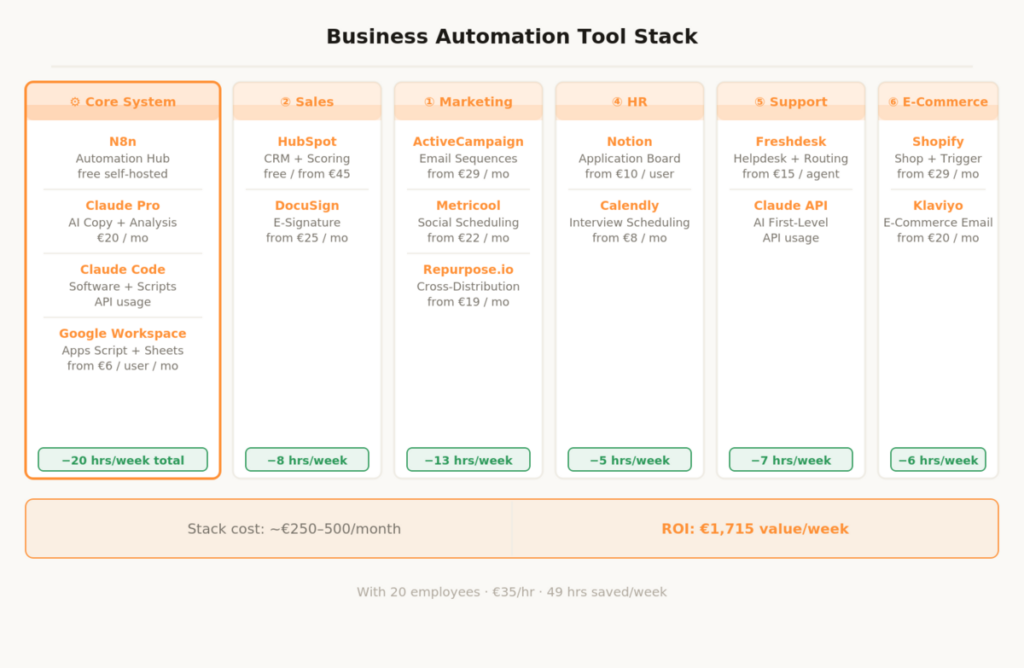
Total cost of the complete stack: €250–500/month depending on configuration and team size. At an average hourly rate of €35 and 49 saved hours per week, that equals a monthly value of over €6,800. The stack pays for itself in the first week of operation.
Business Automation – The Most Important Questions
Where should an SME start?
With the area that generates the most manual effort — and for most SMEs that’s either sales (follow-ups, CRM data maintenance) or finance (invoices, payment tracking). Set up HubSpot Free for CRM and N8n for the first automation — this delivers immediate, measurable time savings without a large setup effort. Then one area per month, thoroughly and completely, before adding the next.
Do I need developers to set it up?
For N8n workflows: no, if you have a basic understanding of data structures. For Google Apps Scripts, custom dashboards and landing pages: you used to — today you don’t anymore. Claude Code handles the development. An SME with Claude Code in the stack doesn’t need an external developer for standard automation tasks. For complex enterprise integrations and bespoke software products, developer know-how remains relevant — but that scope shrinks with every Claude Code iteration.
What does business automation really cost?
The stack costs €250–500/month in ongoing operation. On top comes a one-time setup effort: internally two to four weeks per area, or externally through specialized agencies. With Claude Code and N8n, the internal setup effort is significantly lower than with classic implementations — many solutions that used to cost developer hours are now buildable internally in hours.
How do I prevent automation from feeling impersonal?
Through brand voice documents and human review points at the right places. Every automated communication runs through Claude with specific brand context. The result sounds like the brand. Additionally, the principle of strategic humanity applies: explicitly define which touchpoints always remain human — first conversations, contract negotiations, escalations, personal thank-you messages. Everything else the system can handle.
What can’t be automated?
Strategy, relationships and creativity. No automation makes the decision about which market a company should expand into. No system replaces the trust built in a personal customer conversation. No AI generates the creative idea behind a campaign that goes viral. Business automation frees up capacity — what SMEs then do with that capacity determines the actual growth effect.
How do I measure ROI?
Three metrics are enough: hours saved per week multiplied by the average hourly rate gives the monetary value of the time savings. The close rate in sales before and after CRM automation shows the sales effect directly. The support ticket resolution rate of the AI chatbot relative to human tickets shows the service efficiency gain. Anyone who tracks these three metrics monthly — ideally automatically via a Looker Studio dashboard — has a complete ROI overview without additional reporting effort.
This article is updated regularly. New tools, better workflows and updated practical experience flow directly in here.