
6 Automation Tools for Any Business
by Sebastian Voppmann
Everyone talks about automation. Most people show endless tool lists with twenty options per category. That’s not helpful. What’s helpful is knowing what has proven itself in daily use — productive, tested, recommended.
This article covers exactly six tools. No alternatives, no “could also work” options. These six tools form the backbone of all automations — from invoice generation to content production to fully autonomous desktop tasks. Anyone who understands and combines these six has an automation stack that covers every business area.
Three of them cost nothing or are already paid for: Google Workspace, Google Apps Script and Apple Automation are already present in almost every business setup. The other three are so affordable that the ROI question answers itself within a week. The entire stack costs less than one hour of work per month — and saves dozens of them.
Tool 01 – Google Workspace
Google Workspace is the data foundation for everything else. Sheets as the central data store for invoices, payment tracking, project overviews and operational processes. Drive as the document hub connected to all other systems via N8n and Google Apps Script. Gmail as the email platform with native filter automations and as the sending layer for all automated communications. Docs as the template source for invoices, contracts and proposals. Forms as the universal data entry trigger for workflows.
What distinguishes Google Workspace from other platforms: the complete integration of all services with each other and the tight connection to Google Apps Script. Sheets and Docs share the same data layer. Gmail and Calendar communicate with Apps Script. Drive events trigger workflows. Everything in one ecosystem, one subscription, one Google account infrastructure.
1.1 Google Sheets as the Operational Core
Sheets isn’t just a spreadsheet — it’s the database, invoice system and reporting tool in one. The finance system runs entirely on three interconnected Sheets tabs: customer master, service tracker and payment tracking. When a service is marked as complete, Apps Script reads the data, generates the invoice and sends it. When a payment comes in, the status is automatically updated. No separate accounting tool needed for standard processes.
For reporting, Looker Studio connects directly to Sheets as a data source and creates real-time dashboards — revenue by month, open items, KPI overviews. N8n automatically sends a summary from the sheet every Monday via Slack and email. The dashboard exists once, the data flows automatically.
1.2 Google Drive as Automated File Hub
Drive isn’t just storage — it’s the trigger for external workflows. N8n monitors defined Drive folders: new file appears → workflow starts. A concrete example: drop a finished video file into the upload folder → N8n handles the entire YouTube upload process with Claude-generated metadata. No manual opening of YouTube Studio, no typing the title.
Apps Script automatically creates the complete folder structure in Drive for every new project: main folder, subfolders for briefings, assets, deliverables and invoices, permissions for all project participants. What used to be five minutes of manual work now runs in under ten seconds.
1.3 Gmail as Automated Communication Layer
Gmail filters reduce daily inbox processing from 30 to under 10 minutes — configured once, runs permanently. Apps Script goes further: new application email detected → automatic acknowledgement, PDF attachment extracted, Claude API analyzes the CV, structured summary saved in Notion, Slack notification to HR. All without a single manual step.
The complete guide to Google Workspace automation with all concrete workflows is in the article Google Workspace Automation – What You Can Automate with Google Apps Script, Sheets, Drive and More.
Google Workspace Business Starter costs €6 per user per month. For a solo business or small team, those are the most valuable six euros in the entire tech stack — Gmail, Drive, Sheets, Docs, Forms, Calendar and Apps Script included. All the automations in this article run on this base subscription. No expensive upgrade needed.
Tool 02 – Google Apps Script
Google Apps Script is the most underestimated automation tool in the entire Google Workspace world. It’s free, already included in the subscription, runs directly in the Google Cloud without an external server and connects all Google services with each other. Anyone using Google Workspace without using Apps Script is leaving the most powerful tool in the subscription unused.
Apps Script is JavaScript that runs directly in Google Workspace. You open a script via Extensions → Apps Script in any Google service. It can read and write Sheets, generate and populate Docs, send Gmail messages, create and move Drive files, create Calendar events and call external APIs. All in one language, all in the browser, all for free.
2.1 What Google Apps Script Handles for You Daily
Invoice generation: Apps Script reads customer data and line items from Sheets, populates a Google Docs template with all placeholders, exports the document as PDF and sends it via Gmail directly to the client — triggered by a single status update in Sheets. What used to be 15 minutes of manual work now takes three seconds.
Payment tracking: A daily script checks all open invoices in the tracking sheet, compares the due date to today’s date and triggers the reminder workflow in N8n on overdue items. The dunning process runs completely automatically — even when the entire team is on holiday.
Automatic project folders: For every new project entry in the Sheets master, Apps Script creates the complete Drive folder structure, duplicates the briefing template from the template folder and sets all permissions. Built once, in use permanently.
2.2 Claude Code as Apps Script Developer
Writing Apps Script without programming knowledge used to be impossible. Today Claude Code writes all scripts on demand — production-ready, with error handling, with logging, with complete setup instructions. A prompt like “Write a Google Apps Script that automatically generates an invoice as PDF from row X in this sheet and sends it via Gmail” delivers the finished script in under two minutes.
This fundamentally changes how Apps Script is used. Anyone who previously avoided developer costs now builds it themselves. Anyone who used to spend hours debugging lets Claude Code analyze the problem and deliver the corrected version. The barrier between “I’d need this” and “I have this” has dropped to a minimum with Claude Code.
Tool 03 – N8n
N8n is the nervous system of the entire automation stack. It connects all other tools with each other, automates data flows between systems and builds complex workflows without a single line of code — with a visual editor where nodes are connected by drag and drop.
What distinguishes N8n from all other automation middlewares: the self-hosted approach. N8n runs on its own VPS for €10 to €15 per month. No per-workflow costs, no per-execution limits, no feature gates. Anyone running a hundred workflows with a thousand daily executions each pays the same amount as for a single workflow. This makes N8n the most affordable and powerful automation middleware on the market.
3.1 What N8n Handles for You Daily
Lead capture: Every new lead who fills out a form on the website lands automatically in HubSpot, in ActiveCampaign, in Notion and as a Slack notification to the sales team — in under five seconds, completely automatically.
Dunning: N8n checks all open invoices in the payment tracking every day. Overdue by 7 days: first reminder. Overdue by 14 days: second reminder. Overdue by 30 days: escalation to the responsible person. Every action is written back into the tracking sheet. This workflow runs automatically every day — even when no one is in the office.
Content distribution: Every new blog post in WordPress triggers social media captions via Claude API, a newsletter teaser in ActiveCampaign and a Slack notification to the team — all via N8n automatically. What used to be 45 minutes of manual follow-up runs completely automatically.
3.2 N8n and Claude: the Strongest Duo in the Stack
N8n alone is a rule-based system — it does what’s defined. Claude via the N8n API makes N8n intelligent: classifying tickets, scoring leads, personalizing emails, creating summaries. N8n moves the data, Claude decides what happens to it. This combination is the core of every advanced automation workflow.
N8n has over 400 native integrations — from HubSpot and ActiveCampaign to Shopify and Freshdesk to Google Workspace and Slack. Anything without a native integration can be connected to any REST API via the HTTP Request node. In practice, there is no relevant business tool that can’t be connected to N8n.
The complete N8n guide with concrete workflow examples for all business areas is in the article N8n Automation – All Areas You Can Automate with It.
Tool 04 – Apple Automation
Apple Automation is the only category in the stack that costs almost nothing — because it’s already paid for. Shortcuts, Focus modes, Back Tap, Automator and Apple Script come pre-installed on iPhone, iPad and Mac. Keyboard Maestro as the only paid third-party app costs a one-time $36.
Apple Automation is the personal layer over everything else. Where N8n automates business processes, Apple Automation automates the daily personal actions: scanning and filing invoices, daily briefing at the touch of a button, automatic Focus modes that switch between work contexts without willpower.
4.1 Shortcuts as a Daily Work Tool
Back Tap twice on the iPhone back: document scanner opens, receipt is scanned, PDF is automatically named with today’s date and uploaded directly to Google Drive, N8n webhook triggers further processing. From receipt in hand to filed away in under thirty seconds.
Morning daily briefing shortcut: today’s calendar events, open tasks from Notion, weather forecast — all in one action, without opening apps. Meeting shortcut: activate Focus mode, open Notion, prepare note template, start timer. All in one tap.
4.2 Focus Modes as Automatic Work Operating System
Four Focus modes cover the entire working day: Work Focus activates automatically Monday to Friday from 9 to 12 and 14 to 18 — social media blocked, only team calls through. Meeting Focus activates automatically for every calendar event with Meeting/Call in the title — all notifications silent. Deep Work Focus is activated manually — not a single ping. Evening Focus from 19:00 daily — all business channels silent, no exceptions.
All four Focus modes sync simultaneously across iPhone, iPad and Mac via iCloud. Configured once, they run permanently without willpower. The complete guide with all Apple automation workflows is in the article Apple Automation – How Entrepreneurs Put iPhone, iPad and Mac to Work for Them.
Tool 05 – Claude Code
Claude Code is Anthropic’s terminal-based coding tool — and the tool that has fundamentally changed the relationship between entrepreneurs without programming knowledge and technical automations. Claude Code runs directly on the local machine, reads files, writes code, executes scripts and builds complete projects — on demand in natural language.
What used to keep a developer busy for two days, Claude Code handles on demand in minutes. Google Apps Scripts, N8n workflow configurations, Apple Scripts, landing pages, internal dashboards, debugging sessions — all on prompt, all production-ready, all directly on the machine. No copy-paste between chat and editor, no waiting for external developers, no agency costs for standard automation tasks.
5.1 What Claude Code Can Build for You Daily
Google Apps Scripts: every script in the finance system, every invoice generation, every automation in Google Workspace can be written by Claude Code. The process is always the same: describe the requirement in natural language, Claude Code delivers the finished script with error handling and setup instructions, paste it into the script editor, test it, done.
N8n workflow configurations: Claude Code writes complete N8n workflows as JSON exports that can be imported directly into N8n. Anyone needing a new workflow describes what it should do — Claude Code delivers the finished configuration. No manual node-by-node building in the editor for complex workflows.
Landing pages and tools: complete, responsive HTML/CSS pages in under an hour. Internal dashboards, calculators, data visualizations — all on demand. What used to be a week of developer work is now one hour with Claude Code.
5.2 Claude Code and Apple Script
Apple Script is the most powerful automation language in the Mac ecosystem — and the one with the steepest learning curve. Claude Code solves this completely: describe the requirement, get the finished Apple Script back, paste it into the Script Editor, run it. No manual learning of Apple Script syntax, no debugging without explanation. Claude Code writes, explains and corrects on demand.
Tool 06 – Claude Cowork
Claude Cowork is the newest tool in the stack — and the one with the greatest potential for the coming years. Launched in January 2026 as a Research Preview, Claude Cowork is an autonomous desktop agent that handles tasks completely independently on your own machine. Not as a chat assistant, but as a real digital colleague to whom you give a task — and who executes it.
Claude Cowork runs in the Claude Desktop App and gets permission-based access to defined local folders. It can read, edit and create files, generate documents from screenshots, organize folders according to defined rules and address external services with MCP-compatible connectors. The Dispatch feature allows you to assign tasks to Cowork from your smartphone — and find them finished on the desktop.
6.1 What Claude Cowork Already Handles for You
Content batching: create a folder with raw scripts, give Cowork the task to process all scripts and save caption variants for all platforms in a structured file. Cowork handles this autonomously — while you work on something else or have delegated the task via Dispatch from your iPhone.
Invoice processing: incoming invoices from a defined folder are automatically processed by Cowork — extract invoice data, enter into the payment tracking, categorize. What used to be manual reviewing and typing runs as an autonomous Cowork task completely on its own.
File organization: Cowork monitors the desktop folder and automatically organizes new files by type and project. The desktop stays permanently clear, without manual tidying.
6.2 The Honest Assessment of Cowork
Claude Cowork is Research Preview. For clearly defined, bounded tasks with non-sensitive data it is already productively usable today. Anthropic recommends not using Cowork alongside applications that process sensitive data. Anyone using Cowork should start with simple, reversible tasks — and get to know the tool before embedding it in critical workflows.
The development speed is remarkable: in a few months Cowork has expanded from a macOS preview to Windows, the Dispatch feature has been added and Anthropic has published eleven open-source plugins for CRM, legal and other areas. What is Research Preview today will be stable production functionality in a few months.
The complete guide to Claude Code, Cowork, Claude Pro and the Claude API is in the article Claude Automation – How Claude Pro, Claude Code and Claude Cowork Put Your Business on Autopilot.
Claude Cowork gets access to local folders — that’s its strength and simultaneously the point that requires caution. Anthropic clearly recommends not using Cowork alongside applications that process sensitive data. For tasks involving customer data, financial data or confidential documents: either create dedicated folders without access to sensitive areas, or wait until Cowork leaves Research Preview status. For all other tasks — content batching, file organization, document generation from your own templates — Cowork is already productively usable today.
How the Six Tools Work Together
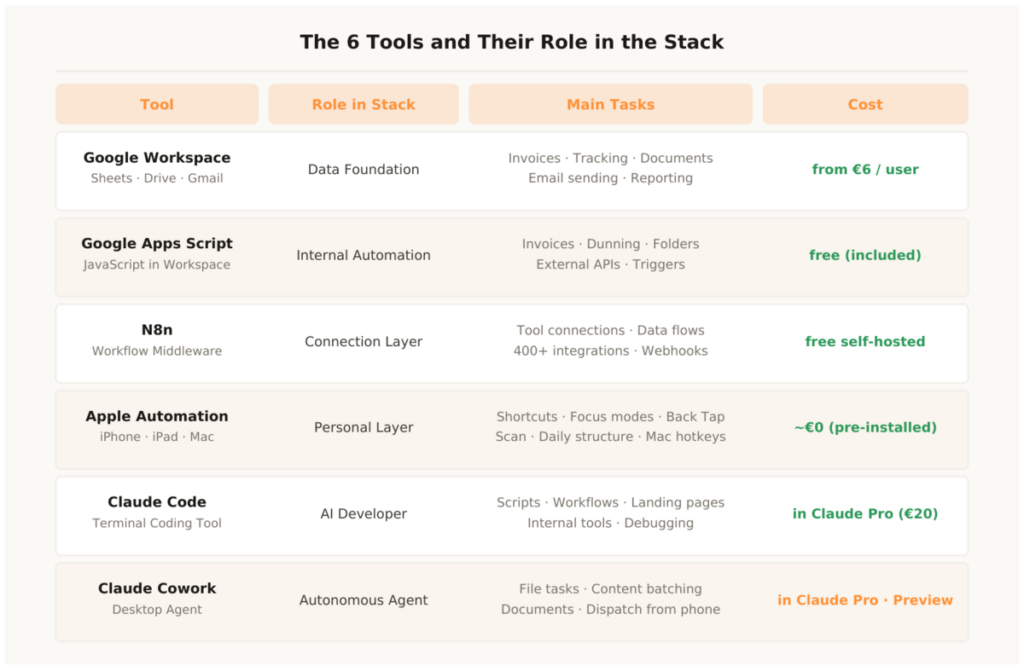
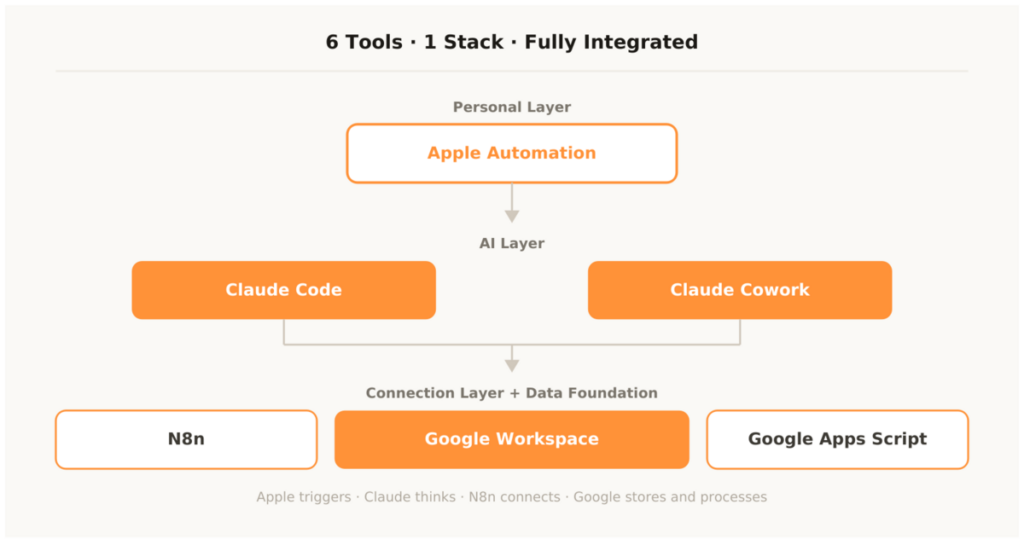
Each of the six tools has a clearly defined role in the stack. No tool overlaps with another — each does exactly what it’s best suited for.
Google Workspace is your data foundation: Sheets holds all operational data, Drive stores all documents, Gmail sends all automated emails. Google Apps Script is the internal automation language for all processes that happen exclusively within Google Workspace — generating invoices, creating folders, sending emails from templates.
N8n is the external connection layer: it connects Google Workspace with HubSpot, ActiveCampaign, Slack, Notion, Shopify and all other tools in the stack. Anything that needs to move data between different systems runs through N8n. Apple Automation is your personal layer: iPhone, iPad and Mac as active automation endpoints — scan triggers, Focus contexts, daily structure, physical shortcuts for daily actions.
Claude Code is your developer on demand: scripts for Google Apps Script, workflow configurations for N8n, Apple Scripts for the Mac, landing pages and internal tools — all on prompt, in natural language, production-ready. Claude Cowork is your autonomous agent for batch tasks: tasks that used to be manual and time-consuming are delegated to Cowork — and are done when you get back.
What the Stack Costs in Total
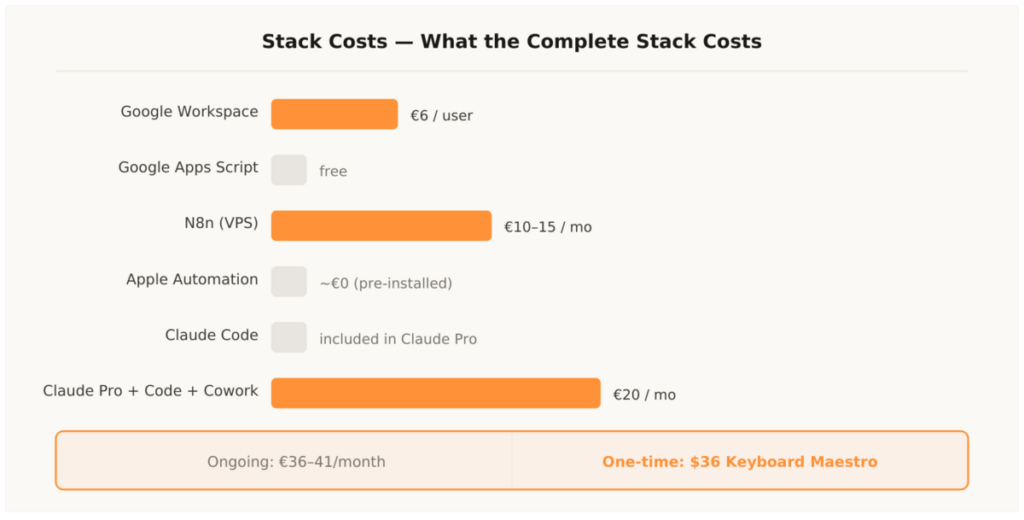
This stack costs under €50 per month for a solo business or small team. For teams with multiple users the Google Workspace costs per user are added — and optionally tools like HubSpot, ActiveCampaign or Metricool, which are added as needed.
Google Workspace Business Starter: €6 per user per month. Google Apps Script: free, included in the subscription. N8n self-hosted: free, only VPS costs of €10 to €15 per month. Apple Automation: Shortcuts, Focus modes and Automator pre-installed, Keyboard Maestro one-time $36. Claude Code: included in Claude Pro subscription. Claude Cowork: included in Claude Pro subscription. Claude Pro: €20 per month.
Total cost for the complete stack: €36 to €41 per month ongoing, plus one-time $36 for Keyboard Maestro. At an hourly rate of €50 the entire stack pays for itself through the first saved working hour — and every further hour after that is pure gain. That’s the ROI calculation framework for this stack: not a question of whether it’s worth it, but only how much it saves.
Automation Tools – The Most Important Questions
Do I need to set up all six tools at the same time?
No. The sensible order: week 1 — subscribe to Claude Pro, write brand voice document, build first scripts with Claude Code. Week 2 — set up N8n, build the first simple workflow. Week 3 — Google Apps Script with Claude Code for the most important finance automation. Week 4 — set up Apple Shortcuts and Focus modes. Month 2 — activate Claude Cowork, test first autonomous tasks. Anyone who tries to set up all six tools in one week doesn’t set any of them up properly.
Which tool delivers the fastest ROI?
Claude Code. Because it’s immediately usable, needs no infrastructure and delivers scripts for every area right away. Second place: N8n, because the first workflow — form submission → CRM → Slack — is live in under an hour and saves work permanently afterwards. Third place: Apple Shortcuts with the invoice scan workflow, which is used multiple times daily.
Can I use N8n without my own server?
Yes — N8n Cloud from €20 per month is the hosted alternative without your own server administration. For teams without technical resources, N8n Cloud is the simpler entry point. Anyone who later wants to scale or reduce costs can switch to self-hosted. Workflows are fully portable between both variants.
What distinguishes Claude Code from Claude Cowork?
Claude Code is a terminal tool — you give commands, Claude Code builds and modifies code directly on your machine. It’s interactive: you see what Claude does, can intervene, extend the context. Claude Cowork is an autonomous agent — you give a task, Cowork handles it completely independently in a defined folder area. Claude Code for technical development tasks, Claude Cowork for autonomous file and document tasks.
How do I connect Apple Automation to the rest of the stack?
Via N8n webhooks. Apple Shortcuts can send HTTP requests that trigger N8n workflows. The invoice scan shortcut on the iPhone scans the document, uploads it to Google Drive and sends a webhook to N8n — N8n triggers further processing: OCR, data extraction, entry into the payment tracking sheet. The iPhone becomes a physical remote control for the entire business stack. This is exactly the integration philosophy behind business automation: every device, every surface becomes an active trigger point for automated processes.
This article is updated regularly. New tools enter the stack when they offer a clear advantage over existing tools — not because they’re new. The stack stays deliberately small: six deeply integrated tools beat twenty loosely connected ones. That’s the approach that has proven itself in practice.