Business Automation – The Complete Overview: All Areas, Tools and Strategies for Entrepreneurs
by Sebastian Voppmann
Automation isn’t a trend. It’s the most fundamental change in how businesses operate — since the introduction of the computer. Anyone still putting in the same manual effort today as five years ago isn’t slowly falling behind. They’re falling behind fast.
This article is the starting point for all automation topics on this website. It provides the complete overview: which areas can be automated, which tools and systems play a role, where to start and what the overall system looks like that holds everything together. Every area has its own deep-dive article — this one shows the big picture.
The goal is not a maximally automated business where no human decision is ever made. The goal is a business that systematically hands repetitive, rule-based tasks to machines — so humans can focus on what actually creates value: strategy, relationships, creativity, decisions.
What Automation Actually Means
Automation doesn’t mean replacing employees. It means freeing employees from tasks that don’t require human judgment — so they can focus on the tasks they should be doing. The difference sounds subtle but is fundamental: automation isn’t a cost-cutting instrument, it’s a growth instrument.
A mid-sized company with twenty employees produces over 300 hours of repetitive effort per week. Answering emails according to standard patterns, transferring data from one system to another, compiling reports, creating invoices, scheduling social media posts, reviewing applications, sending payment reminders. Not a single one of these steps requires human judgment. All are automatable.
Conservatively estimated, 40 to 50 percent of total workload in a typical SME is automatable — without any loss of quality, personality or anyone’s job. That corresponds to 6 to 8 full-time positions that don’t need to be replaced — or capacity that can be reinvested into real growth.
Automation also isn’t a question of company size. A solopreneur who spends two hours daily on emails, social media planning and invoices benefits just as much as a twenty-person company. The difference is only in the volume of automatable tasks — not in the fundamental logic.
The most important ground rule: automate only what you understand and have documented manually first. A process that’s broken manually only becomes broken faster through automation. Anyone investing directly in tools without knowing the process buys an expensive asset that never delivers the promised ROI.
The Seven Automation Areas at a Glance
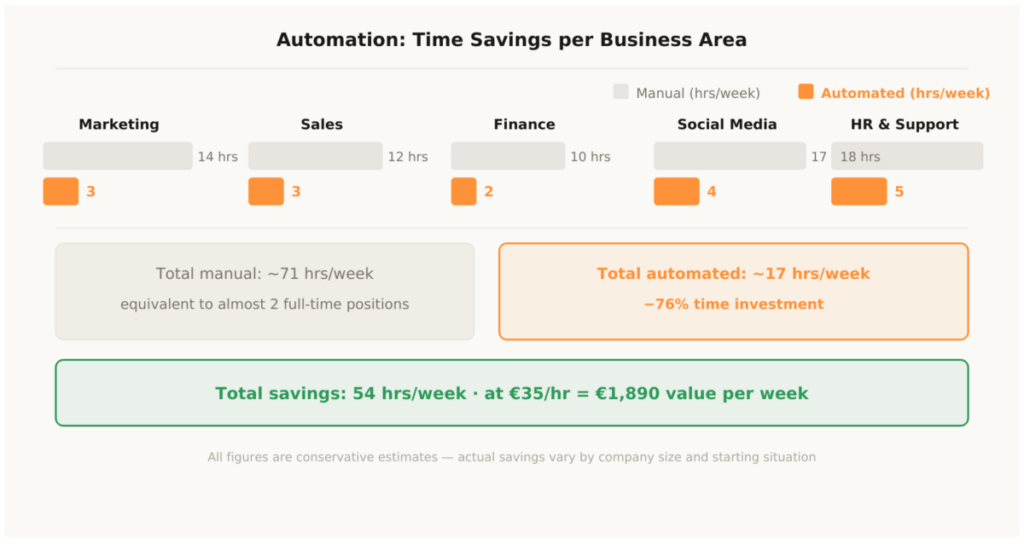
Every business area has its own automation levers — and its own tools that are best suited for them. Here’s the complete overview, with references to the respective deep-dive articles.
1.1 Business Automation — the Big Picture
Business automation is the overarching framework for all other areas. It’s about how a business can be automated as a whole — not just individual departments or channels, but all six core areas simultaneously: marketing, sales, finance, HR, support and product/e-commerce.
The central lever is N8n as automation middleware — the nervous system that connects all tools and automatically moves data between systems. Claude as the AI core handles all text-based tasks. Google Workspace as the data foundation holds invoices, projects and reports together. The complete overview with concrete workflows and tool stacks for all six areas is in the article Business Automation – Complete Strategy for SMEs: Systems, Tools and Workflows per Business Area.
1.2 Marketing Automation — Email, CRM, SEO, Ads and Funnel
Marketing is the area with the fastest and most visible ROI from automation. Email sequences that run permanently for every new subscriber. Lead scoring that automatically identifies the hottest prospects. Social media scheduling that works without daily manual intervention. Paid ads that perform through smart bidding and automatic bidding strategies without manual optimization.
The complete stack — from email through CRM to paid ads and funnel automation — is documented in the article Marketing Automation – Complete Strategy: Systems, Tools and Workflows (−80% manual effort).
1.3 YouTube Automation — from 22 Hours to under 4 Hours per Video
YouTube is the platform with the highest production effort — and simultaneously the highest automation leverage. AI-powered scripting with Claude, editing templates, automatic pause removal with Gling, fully automated upload via N8n workflow with AI-generated metadata. What used to cost 22 hours per video now runs in under 4 hours. The complete system setup step by step is documented in the article YouTube Automation – Complete Strategy: Tools & Workflows (−87% time savings).
1.4 Instagram Automation — from 17 Hours to under 4 Hours per Week
Instagram lives on daily presence and visual consistency — both of which are excellent to automate. Canva templates for all formats, CapCut for Reels production, Claude for captions and hashtags, Later for scheduling, ManyChat for comment-to-DM flows. From 17 hours of manual effort to under 4 hours per week. The complete workflow is described in the article Instagram Automation – Complete Strategy: Workflows and Tools (−75% time spent).
1.5 TikTok Automation — Posting Daily in 4 to 5 Hours per Week
TikTok rewards frequency more than any other platform — one to three videos daily is the reality for accounts that really want to grow. That sounds like a full-time job. With the right system it’s 4 to 5 hours per week: weekly plan with Claude and TikTok Creative Center, batch production with CapCut templates, caption automation, native scheduling in Creator Studio, cross-distribution via Repurpose.io. The complete stack is in the article TikTok Automation – Complete Strategy: Workflows and Tools (−72% time spent).
Don’t tackle all areas at once. The proven order: month 1 → set up email automation and CRM. Month 2 → social media scheduling and content production with Claude. Month 3 → finance and invoice automation. Month 4 → HR and support. Build and test one area completely before the next one is added. Anyone building everything in parallel builds everything half-finished.
The Central Automation Tools
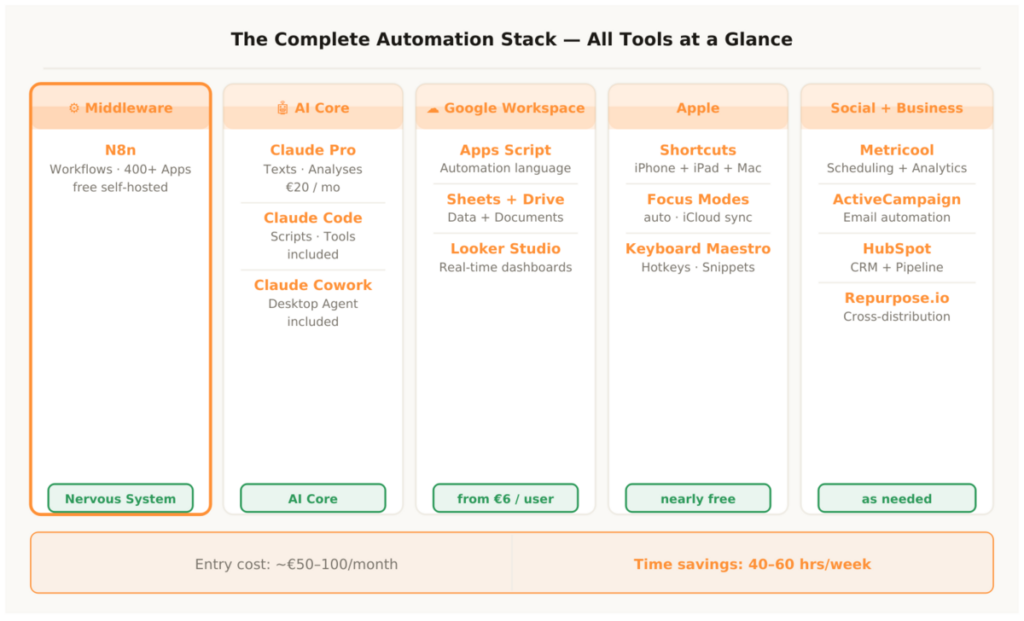
Behind every well-automated business isn’t a single tool, but a stack of specialized tools connected to each other via middleware. Here are the four tool categories that play a role in almost every stack.
2.1 N8n — the Nervous System
N8n is the automation middleware that connects all other tools with each other. Self-hosted for free, over 400 native integrations, no artificial limits on workflows or executions. Every workflow that moves data from one tool to another — lead from form into CRM, new order to warehouse and accounting, published article to all social media channels — runs through N8n.
What distinguishes N8n from other automation tools: the self-hosted approach. Anyone running N8n on their own server pays only the server costs — around €10 to €15 per month — and has no further costs regardless of volume. The complete N8n guide with concrete workflow examples for all business areas is in the article N8n Automation – All Areas You Can Automate with It.
2.2 Claude — the AI Core
Claude is the AI system behind almost all text-based automations in this stack. Claude Pro for texts, captions, briefings and analyses. Claude Code for scripts, workflows, landing pages and internal tools — without programming knowledge. Claude Cowork as an autonomous desktop agent for file tasks, document processing and content batching.
Claude isn’t just another AI tool among others — Claude is the AI core that makes all other automations intelligent. Where N8n moves data, Claude decides what happens to that data: classify an email, draft a proposal, analyze an application, process an invoice. All in one subscription, €20 per month. The complete Claude guide is in the article Claude Automation – How Claude Pro, Claude Code and Claude Cowork Put Your Business on Autopilot.
2.3 Google Workspace — the Data Foundation
Google Workspace is already present in most businesses — and still rarely used as an automation platform. Google Apps Script, which is included in the subscription for free, connects all Google services with each other and with external tools. Generating invoices from Sheets, tracking payments, creating automatic reports, populating documents from templates — all of it built by Claude Code on demand in minutes.
The complete guide to Google Workspace automation — from Apps Script through Gmail to Looker Studio — is in the article Google Workspace Automation – What You Can Automate with Google Apps Script, Sheets, Drive and More.
2.4 Apple Automation — the Personal Work Ecosystem
Apple Automation is the only category in this stack that costs almost nothing — because it’s already paid for. Shortcuts on iPhone, iPad and Mac automate daily actions: scanning and filing invoices, daily briefing at the touch of a button, Focus modes that automatically switch between work, meetings and end of day, Back Tap as a physical instant trigger for the most important workflows.
For entrepreneurs, Apple Automation is the personal layer over everything else: it connects personal devices with the business stack, makes the iPhone a remote control for N8n workflows and structures the workday without willpower. The complete guide is in the article Apple Automation – How Entrepreneurs Put iPhone, iPad and Mac to Work for Them.
How the Areas Connect
The most important thing about a well-built automation stack isn’t how many tools it contains — it’s how well these tools communicate with each other. A stack of ten poorly connected tools does less than four well-connected tools.
The three automation levels from the previous section don’t exist in isolation — they build on each other. Level-one workflows deliver the data that level-two workflows react to. Level-two decisions trigger level-three processes. A business that has built all three levels doesn’t have a patchwork of individual automations — it has a system that moves itself forward.
3.1 The Data Flow Across All Areas
An example that connects all areas: a new lead fills out a form on the website. N8n receives the data via webhook → writes the lead into HubSpot CRM → enters the email in ActiveCampaign, where the welcome sequence automatically starts → Claude API analyzes the lead and gives a purchase readiness assessment → Slack notification to sales with the Claude assessment and a direct HubSpot link. All in under five seconds, completely automatically, for every lead, 24 hours a day.
A second example for the marketing-to-operations flow: a new blog post is published in WordPress → N8n detects this via WordPress trigger → Claude API automatically generates three social media captions (LinkedIn, Instagram, Twitter) and a newsletter teaser → Metricool schedules all posts for the optimal time → ActiveCampaign sends the newsletter teaser → Slack informs the team. Built once, this workflow runs permanently for every article without manual intervention.
The power lies not in the individual workflows but in their connection. N8n is the link: it takes data from one system, enriches it with Claude intelligence and routes it to the next system. The entire flow happens in seconds, without manual intervention, at any time of day or night.
3.2 The Automation Pyramid
Not all automations have the same effort and the same ROI. It helps to think in three levels. Level one is simple trigger-action workflows with high immediate ROI: form submission → CRM entry, new document → automatically filed and named, overdue invoice → automatic reminder email. These workflows are built in under an hour and deliver immediately measurable time savings.
Level two is multi-step workflows with AI intelligence: lead analysis with Claude, automatic proposal generation, application screening with structured summary, ticket classification and reply drafts. These workflows need two to four hours of setup time but deliver significantly higher value per automation.
Level three is complete process automations that combine multiple systems and AI decisions: complete order workflow from Shopify through warehouse to invoice and CRM, complete onboarding process from signed contract to the first onboarding email, complete content production stack from keyword to published article on all channels. These automations need more setup time — but they run permanently afterwards and scale without proportional additional effort.
- Step 1: Document processes — what runs manually and always the same way every day?
- Step 2: Prioritize — which automation saves the most time per setup effort?
- Step 3: Set up N8n — self-hosted or cloud, build first test workflow
- Step 4: Subscribe to Claude Pro, write brand voice document
- Step 5: Fully automate one area, test, optimize
- Step 6: Add the next area — one per month, not all at once
Time Savings: What Automation Actually Delivers in Practice
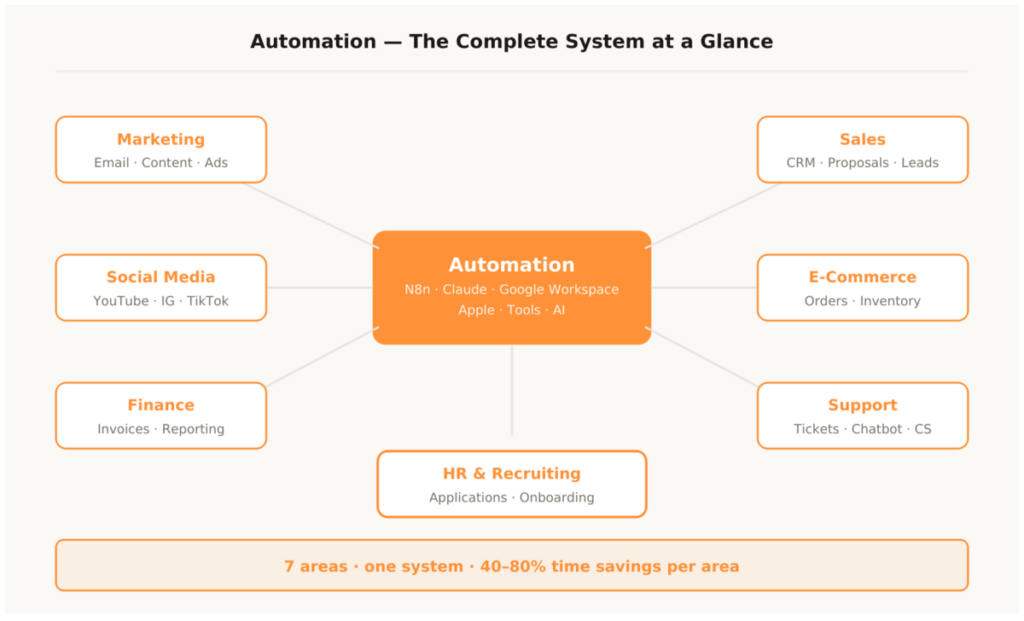
Numbers are more persuasive than promises. The overview above shows the real time savings per business area — based on conservative estimates from practical use. Anyone who builds their stack completely typically exceeds these figures.
The automation pyramid isn’t just a conceptual model — it’s a practical prioritization tool. Anyone who starts with level-three workflows without having level-one foundations is building on sand. Most failed automation projects didn’t fail because of the technology — they failed because of the wrong order. Simple first, then complex. One area first, then all of them.
What Can Be Automated — and What Can’t
The most important boundary in any automation project is the boundary between automatable and non-automatable tasks. Anyone who knows it automates intelligently. Anyone who ignores it risks the system running — but doing the wrong things faster.
4.1 What Can Be Automated
Automatable are all rule-based, repetitive tasks with clearly defined inputs and outputs. Email sequences after defined triggers: always the same, always reproducible, zero judgment required. Social media scheduling: time and content are known, the execution is mechanical. Lead scoring based on behavior: define the rules, the system evaluates. Generating invoices: data is available, the document always follows the same schema. Sorting and naming files by type: purely rule-based. Sending payment reminders: check the date, send the email.
The rule of thumb: if a task is performed more than three times per week, always runs the same way and requires no situational judgment — it’s an automation candidate.
4.2 What Can’t Be Automated
Not automatable are all tasks that require genuine creativity, empathy, strategic thinking or situational judgment. The decision of which market a company should expand into next — not automatable. The first conversation with an important client that builds trust — not automatable. The creative core idea behind a campaign that goes viral — not automatable. Handling a dissatisfied client in an escalation situation — not automatable.
This isn’t a weakness of automation — it’s its strength. Anyone who automates all repetitive tasks has more time for the tasks that genuinely require human thinking. That’s the real value: not cost reduction, but capacity for what really counts.
A common misconception: automation depersonalizes communication. That’s only true when you automate wrong. Anyone who builds email templates without a brand voice document and without personalization logic sends generic mass emails. Anyone who combines Claude with a precise brand voice document, CRM data and a solid prompt sends personalized emails that feel as if written by a human — because the voice is right, the data is right and the context is right. The quality of the automation depends directly on the quality of the preparation. This is what separates effective automation tools usage from ineffective usage.
Too much at once. Setting up ten tools in parallel without truly understanding a single process. The result: ten half-finished automations that together cost more than they save, because no one has time to maintain them. The right approach is always the same: document a process manually, build one workflow, test it, optimize it — then the next one. Automation isn’t a project you do once. It’s a system you build.
Automation – The Most Important Questions
Where should I start if I have no automation yet?
With email and CRM. The welcome sequence for new subscribers and a simple CRM with lead scoring deliver the fastest ROI with the least setup effort. HubSpot Free for CRM, ActiveCampaign for email automation, Claude Pro for all copy. These three tools together cost under €50 per month and cover the most important marketing and sales automations.
What does a complete automation system cost?
The entry stack — Claude Pro, HubSpot Free, ActiveCampaign Starter, N8n self-hosted, Google Workspace — costs under €80 per month. The complete stack with social media tools, support platform and e-commerce integration is €250 to €500 per month. At an average hourly rate of €35 and 40 hours saved per week, that’s a monthly value of €5,600. The stack pays for itself in the first operating week.
Do I need technical skills?
For 80 percent of the described automations: no. N8n has a visual drag-and-drop editor. Claude Code writes all scripts on demand in natural language. Apple Shortcuts are usable without programming knowledge. Google Apps Script is written by Claude Code. What requires basic technical understanding — N8n self-hosting, complex API connections, custom dashboards — Claude Code also solves in most cases.
How long does the build take?
Realistically two to three months for a fully functioning stack — not because of the complexity of the tools, but because of the necessary process documentation. Anyone who has already documented their processes can fully automate one area in two to three weeks. Every automation needs a understood process as its foundation. The right approach: one area per month, fully documented, fully automated, fully tested. After three months the stack is running — after six months it’s fully optimized.
Which tools are essential — and which are optional?
Three tools are indispensable in every stack: Claude Pro for all AI-powered tasks, N8n for all connections between tools and Google Workspace as the data foundation. Everything else is optional and depends on the specific business processes. Anyone who only automates marketing doesn’t need Freshdesk. Anyone without e-commerce doesn’t need Shopify. The stack grows with the requirements — it doesn’t have to be complete from day one.
How do I keep the stack current?
Automation isn’t a project that’s ever finished. Tools change, processes evolve, new integration possibilities emerge. The right approach: monthly review of all active workflows, quarterly audit of the entire stack, continuous addition of new automations for newly identified repetitive tasks. Anyone who reviews and optimizes their stack once per quarter has a system after one year that is significantly more powerful than on the first day.
What ROI can I realistically expect?
Conservatively: 20 to 40 hours saved per week in a typical SME with 10 to 20 employees. At an hourly rate of €35 that’s an annual value of €36,000 to €72,000. The stack costs €3,000 to €6,000 per year. ROI: 600 to 1,200 percent. These figures are conservative — businesses that fully build out their stack regularly report significantly higher savings.
Automation isn’t a one-time investment — it’s a system that grows with the business. Anyone who starts once finds twenty automations after three months that have become so natural they can barely imagine what their workday looked like before. That’s the compounding effect of automation: each automation on its own is a small improvement — together they fundamentally change how a business operates. For deeper dives into specific areas, explore the complete guide to automation tools or the full business automation strategy.
This article is updated regularly. New areas, new tools and new strategies flow directly in here.