
N8N Automation – Every Business Area You Can Automate
by Sebastian Voppmann
N8n is the tool running in the background of our entire automation stack — and one most businesses still haven’t heard of. No expensive SaaS subscription, no vendor lock-in, no monthly costs when you self-host it. N8n connects all your tools, automates data flows between systems and builds complex workflows without a single line of code.
What sets N8n apart from other automation tools: it runs either self-hosted on your own server — free, permanent, with no usage limits — or as N8n Cloud from €20/month for teams that don’t want to run their own infrastructure. Once you understand how N8n works, you’ll wonder how your business ever managed without it.
This article covers every area where N8n is used in practice — from marketing and sales through finance and HR to e-commerce and internal operations. Each area includes a concrete workflow example you can replicate directly. No abstract theory — these are automations we use ourselves every day.
What N8n Is — and Why It’s Different from Other Tools
N8n is a workflow automation tool with a visual editor. You connect nodes — each node represents an action or an integration. A trigger node starts the workflow, action nodes execute steps, and logic nodes control the flow based on conditions.
Three things set N8n apart from other tools. First: self-hosting. N8n runs on any VPS for €10 to €15 per month — with no further costs after that, regardless of how many workflows run or how many operations are executed per month. Comparable cloud tools charge hundreds of euros monthly once you hit a certain volume.
Second: no artificial limits. N8n doesn’t cap the number of workflows, executions or connected apps. Running a hundred workflows with a thousand daily executions each costs exactly the same as running a single workflow.
Third: full flexibility through code nodes. When a standard node doesn’t exist or you need complex logic, you write a JavaScript or Python node directly in the editor. This makes N8n a tool that grows with your requirements — from simple three-step workflows to complex enterprise automations. N8n has over 400 native integrations: all major CRMs, email platforms, social media tools, databases, cloud storage services, communication tools and APIs. Anything without a native integration connects via HTTP Request nodes to any REST API.
Area 01 – Marketing Automation with N8n
Marketing is the area where N8n delivers the most immediately visible results. Every manual data move between marketing tools — lead from form to CRM, CRM entry to email platform, published article to all social media channels — can be mapped as an N8n workflow. The complete marketing automation strategy with all tools and channels is documented in the article Marketing Automation – Complete Strategy: Systems, Tools and Workflows.
1.1 Example Workflow: Lead Capture Automation
A new lead fills out a form on the website. What happens manually: someone opens the form backend, copies the data into the CRM, enters the email into ActiveCampaign, sends a manual confirmation email. That takes five to ten minutes — if it doesn’t get forgotten.
With N8n: Webhook Node receives the form data in real time → HubSpot Node automatically creates the contact in the CRM → ActiveCampaign Node adds the email to the defined list and starts the welcome sequence → Slack Node notifies the responsible salesperson. This happens in under three seconds, for every lead, 24 hours a day.
1.2 Example Workflow: Content Distribution Automation
A new blog post is published in WordPress. N8n detects this via the WordPress Trigger Node → Claude API automatically generates a social media caption for LinkedIn, a shorter version for Twitter/X and a newsletter teaser → Metricool Node schedules all posts at the optimal time → ActiveCampaign Node sends the newsletter teaser to the subscriber list → Slack Node informs the team.
This workflow runs fully automatically every time an article is published. What used to be 45 minutes of manual work now runs without human intervention.
Content distribution is a particularly good example of where N8n makes the difference between a single tool and a system. Metricool can schedule social posts — but it doesn’t automatically know when a new article has been published. ActiveCampaign can send newsletters — but it needs to be filled manually. N8n connects these tools into a coherent system: one single trigger, all tools respond simultaneously, no manual intervention needed.
The Webhook Node is the most versatile trigger in N8n. Any tool that supports webhooks — and that’s most modern SaaS tools — can become the trigger for an N8n workflow. Shopify order, Stripe payment, Typeform submission, Calendly booking: all of these can start an N8n workflow. Once you’ve understood webhooks, you’ll see automation opportunities everywhere.
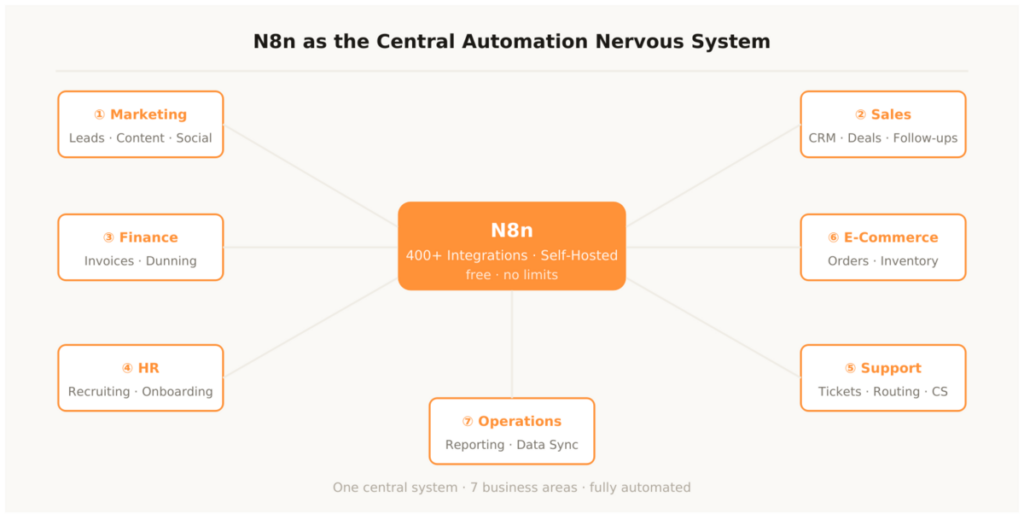
Area 02 – Sales and CRM Automation with N8n
In sales, N8n is the bridge between all the systems a sales team uses every day — and that normally don’t talk to each other. CRM, email platform, calendar, Slack, document tool: without N8n, these are silos. With N8n automation, every data move is automated.
2.1 Example Workflow: Deal Stage Automation
Deal in HubSpot moves to stage “Proposal Sent” → N8n automatically triggers: a reminder task is created in HubSpot for follow-up in 48 hours, Claude API generates a personalized follow-up email based on the deal data, Slack message to the salesperson with a reminder and direct HubSpot link.
Deal moves to stage “Won” → N8n automatically starts: onboarding sequence in ActiveCampaign, new entry in the customer database, Slack notification to the entire team, automatic invoice via Google Apps Script. Not a single manual step — from the won deal to the sent invoice.
2.2 Example Workflow: Lead Reactivation
N8n runs daily at 8am as a Scheduled Trigger → checks all HubSpot leads inactive for 90 days → Claude API writes a personalized reactivation email based on the last touchpoint → ActiveCampaign sends it automatically → result tracking written back to the CRM.
This workflow permanently works a lead pool that would never be touched without automation — because no salesperson has time to manually follow up on 200 inactive leads.
Area 03 – Finance and Accounting with N8n
Finance automation with N8n is the area that delivers the biggest immediate time ROI in most businesses — because manual processes here are particularly expensive and error-prone. We use N8n ourselves daily for invoice and payment management.
3.1 Example Workflow: Automatic Dunning
N8n runs daily as a Scheduled Trigger → reads all open invoices from the Google Sheets payment tracker → checks the due date of each invoice → overdue by 7 days: first friendly reminder email via Gmail → overdue by 14 days: second reminder with a direct payment link → overdue by 30 days: escalation email and Slack notification to the responsible person → all actions automatically written back to the tracking sheet.
This workflow runs daily without manual intervention — including holidays and weekends. No overdue invoice falls through the cracks anymore. The decisive advantage over manual dunning processes isn’t just the time savings — it’s consistency. Every customer receives the right message at the right time, in the right tone. Claude writes the reminder emails based on the brand voice document: friendly for the first reminder, clearer for the second, unambiguous for the escalation. No employee has to figure out how to word this email — the system handles it consistently and without emotional effort.
3.2 Example Workflow: Invoice Trigger
A project is marked as “Completed” in Notion → N8n detects the status change via Notion Webhook → reads all relevant project data (client, services, rate, date) → passes them to Google Apps Script, which generates the invoice as a PDF → Gmail sends the invoice directly to the client → outstanding amount is logged in the payment tracker → Slack notification to accounting.
Area 04 – HR and Recruiting with N8n
Recruiting processes are a massive time drain without automation. Manually confirming every application, coordinating candidates, scheduling interviews, preparing contracts — N8n takes over all rule-based steps in this process entirely.
4.1 Example Workflow: Application Pipeline
New application arrives by email → N8n Gmail Trigger detects the application based on the subject line → Gmail Attachment Node extracts the CV as PDF → Claude API analyzes the CV and creates a structured summary (core competencies, years of experience, strengths, potential gaps) → Notion Node automatically creates a new candidate entry in the recruiting board → Slack message to the hiring manager with the Claude summary and a direct Notion link → automatic acknowledgment email to the applicant.
What used to cost 15 to 20 minutes per application now takes under thirty seconds — fully automatically.
4.2 Example Workflow: Onboarding Start
Signed contract is marked as completed in DocuSign → N8n DocuSign Webhook triggers the onboarding workflow → Notion Node creates the onboarding board for the new employee with all relevant checklists → Slack message to the buddy and the IT admin with start date and tasks → ActiveCampaign starts the four-week onboarding email sequence → Google Workspace automatically creates the new user account.
- Webhook Trigger: Receives data from external tools in real time — forms, Shopify, Stripe, Calendly
- Scheduled Trigger: Starts workflows at defined times — daily, hourly, weekly
- App Trigger: Responds to events in connected apps — new HubSpot deal, new Gmail email, new Notion entry
- Manual Trigger: Starts workflows at the push of a button — ideal for testing and one-off batch operations
- Error Trigger: Starts an error-handling workflow when another workflow fails
Area 05 – Customer Service and Support with N8n
Support automation with N8n goes far beyond simple ticket routing. N8n can classify support requests, prioritize them, route them to the right people and trigger proactive customer success measures — all rule-based, all without manual dispatch work.
5.1 Example Workflow: Intelligent Ticket Routing
New support request arrives in Freshdesk → N8n Freshdesk Webhook triggers immediately → Claude API classifies the request by topic (technical, billing, general) and urgency (urgent, normal, low) → based on classification: technical tickets go to the tech support agent with high priority, billing tickets go to accounting, general requests go to the standard queue → SLA timer starts automatically → if not handled within SLA: automatic escalation message via Slack.
5.2 Example Workflow: Proactive Customer Success
N8n runs daily as a Scheduled Trigger → checks all customer accounts in the CRM for defined triggers: last login more than 14 days ago, Feature X never used, usage frequency dropped by more than 30 percent, contract expires in 30 days → for each trigger type, a different personalized email is automatically generated via Claude API and sent through ActiveCampaign → result (opened, clicked) is written back to the CRM.
The proactive customer success workflow is one of the most impactful uses of N8n in practice — because it prevents churn before it becomes visible. Anyone who waits until a customer cancels has already lost. Anyone who automatically detects that a customer is disengaging and course-corrects in time saves revenue that would never have been saved without automation — because no customer success manager has time to manually check every customer account every day.
Area 06 – E-Commerce and Product Operations with N8n
In e-commerce, N8n is the central hub between shop system, warehouse, accounting and customer communication. Every manual data move between these systems — and there are many — can be mapped as an N8n workflow.
6.1 Example Workflow: Complete Order Workflow
New order in Shopify → N8n Shopify Webhook triggers immediately → parallel execution of multiple actions: Fulfillment Node sends the order to the warehouse provider, HubSpot Node updates the customer entry or creates a new one, Google Apps Script Node generates the invoice as PDF, Gmail Node sends order confirmation and invoice to the customer, Google Sheets Node updates the inventory tracker. All five actions run in parallel — the entire workflow completes in under five seconds.
6.2 Example Workflow: Inventory Monitoring
N8n runs hourly as a Scheduled Trigger → reads inventory levels from the Google Sheets tracker → compares each item against the defined minimum stock level → item below minimum: automatic reorder email to the supplier with quantity and delivery address, Slack notification to purchasing, entry in the reorder log. No more out-of-stock from forgotten manual checks.
Area 07 – Internal Operations and Reporting with N8n
Operations automation is the least visible — and often most underestimated — use case for N8n. Weekly reports, data sync between systems, automatic backups, team KPI notifications: all rule-based, all automatable.
7.1 Example Workflow: Automatic Weekly Reporting
Every Monday at 7am → N8n Scheduled Trigger → automatically collects data from all connected systems: last week’s revenue from Google Sheets, new leads from HubSpot, social media reach from Metricool, open support tickets from Freshdesk → Claude API compiles all figures into a clear weekly summary → Slack message to the management channel with all KPIs and direct links to dashboards → email summary to leadership.
Management has all key KPIs in overview every Monday by 7:10am — without anyone having created a report.
7.2 Example Workflow: Data Sync Between Systems
N8n syncs all contact data daily between HubSpot, ActiveCampaign and the internal Google Sheets customer master. When an email address or company name changes in HubSpot, the change is automatically propagated to all connected systems. No stale records, no more manual reconciliation sessions.
Data sync is one of the most common and most expensive manual processes in companies running multiple tools. When the same customer data has to be maintained in three different systems, inconsistencies are inevitable — and cleaning them up regularly costs hours. N8n solves this once and for all: one sync workflow running daily keeps all systems consistent — without anyone manually intervening.
N8n self-hosted is free and powerful — but requires a basic technical understanding to set up. What you need:
- VPS: A Linux server at Hetzner, DigitalOcean or similar — from €10/month
- Docker: N8n runs as a Docker container — basic Docker knowledge or Claude Code for the setup script
- Domain + SSL: For secure HTTPS access — one-time setup, 30 minutes
- Alternative: N8n Cloud from €20/month if you don’t want to run your own server
Setting Up N8n: Three Ways to Get Started
N8n comes in three variants — the right one depends on technical skill level and budget.
Self-hosted on a VPS is the most powerful and most affordable option. A VPS at Hetzner, DigitalOcean or any other provider for €10 to €15/month is fully sufficient. N8n runs as a Docker container — installation takes under 30 minutes with Claude Code or a ready-made setup script. No monthly tool costs, no usage limits, full data control. Claude Code helps with setup: a prompt like “Set up N8n self-hosted with Docker on an Ubuntu VPS” delivers a complete setup script in under five minutes.
N8n Cloud is the easiest option without your own infrastructure. From €20/month, fully managed by N8n, no server administration. Makes sense for teams that don’t have developer resources and don’t want to self-host.
N8n Desktop is the free local installation for testing and development. Not suitable for production use — but ideal for learning N8n and building first workflows before switching to the production environment.
Regardless of which variant you choose, the first step is always the same: build and run a simple test workflow. Three nodes, one clear goal — for example: Webhook receives data → Google Sheets writes it to a table → Slack sends a notification. This workflow takes 20 minutes and immediately shows whether the setup is correct and how data flows through N8n. After that, the first production workflow can be built.
The Complete N8n Tool Stack
N8n itself is the nervous system — but it needs the right tools at the ends of its connections for workflows to actually work. This list shows the tools we use daily in our N8n stack.
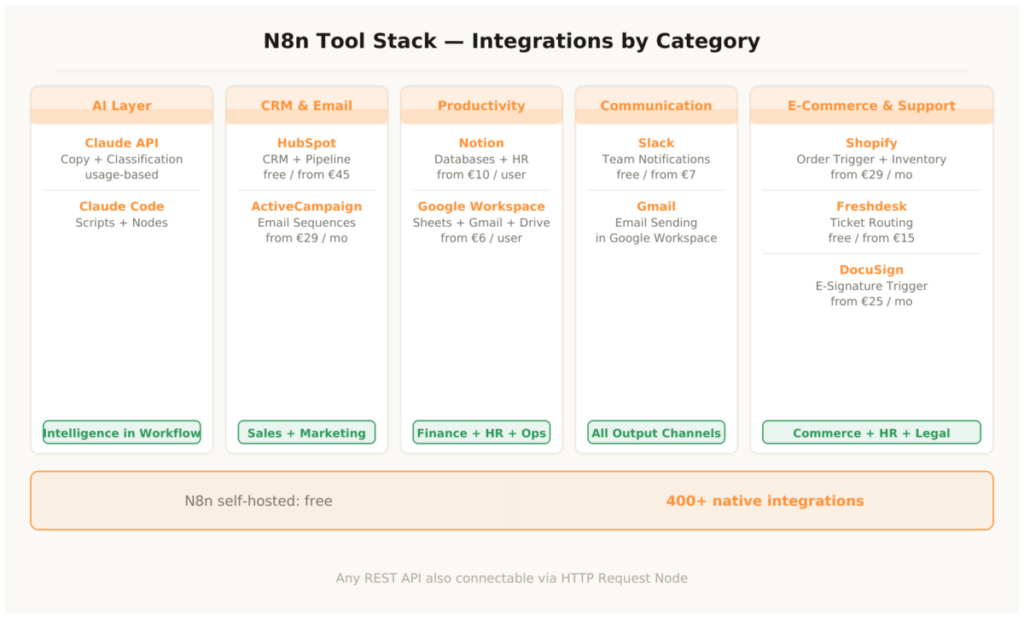
AI Layer
1. Claude API
The AI core of every intelligent N8n workflow. Generate copy, classify content, summarize data, decision logic based on natural language. Integrable into any workflow directly via the HTTP Request Node or the native Anthropic Node. Cost: usage-based from approx. €0.003/1,000 tokens. Setup: easy. Bottom line: Makes N8n workflows intelligent rather than just rule-based.
2. Claude Code
Writes N8n scripts, Google Apps Script integrations and custom nodes on demand — no separate subscription, called directly in chat. Cost: included in Claude Pro. Setup: none. Bottom line: Makes complex N8n setups possible without a developer.
CRM & Email
3. HubSpot
Native N8n integration with all core operations: create contacts, update deals, change pipeline stages, create tasks. Free plan fully usable for N8n workflows. Cost: free / from €45/month. Setup: easy. Bottom line: The ideal CRM for N8n-driven sales automation.
4. ActiveCampaign
Native integration for all email operations: add contacts, start sequences, set tags, manage lists. Standard combination for lead-to-customer automation. Cost: from €29/month. Setup: easy. Bottom line: Best email tool in the N8n stack for automated sequences.
Productivity & Data
5. Notion
Native N8n integration for databases, pages and status updates. Ideal as an operations hub for HR, projects and content pipelines — and as a trigger source when status fields change. Cost: free / from €10/user. Setup: very easy. Bottom line: Connects all internal workflows with one central knowledge system.
6. Google Workspace
Sheets, Docs, Gmail and Drive all natively integrated in N8n. The foundation for finance automation, reporting and document workflows. Combination with Google Apps Script via Claude Code for maximum flexibility. Cost: from €6/user/month. Setup: very easy. Bottom line: Essential for any N8n setup that processes data or generates documents.
Communication
7. Slack
Every N8n workflow can send Slack messages — notifications, reports, alerts, KPI summaries. The output terminal for all automated team notifications. Cost: free / from €7.25/user. Setup: very easy. Bottom line: Makes every workflow visible to the team — without email overload.
E-Commerce & Operations
8. Shopify
Native N8n integration for order triggers, customer updates, product operations and inventory management. Trigger source for all e-commerce workflows. Cost: from €29/month. Setup: easy. Bottom line: The order workflow runs fully automatically from the very first order.
9. Freshdesk
Helpdesk platform with N8n integration for ticket triggers and automatic routing. Combined with Claude API for intelligent classification. Cost: free / from €15/agent. Setup: easy. Bottom line: Together with Claude API, the most powerful support automation duo.
N8n self-hosted costs only the VPS — typically €10 to €15/month. The entire stack around it — Claude, HubSpot, ActiveCampaign, Notion, Google Workspace, Slack — isn’t N8n-specific, it would exist in any modern business setup anyway. N8n just makes it ten times more efficient.
N8n Automation – The Most Important Questions
Do I need coding skills for N8n?
For 80 percent of all workflows: no. The visual editor with drag-and-drop nodes covers all standard automations. For complex logic or custom transformations there are JavaScript and Python nodes. Anyone who needs these uses Claude Code: describe the workflow requirement, get finished script code, paste it into the N8n code node. The combination of visual editor and Claude Code makes N8n fully accessible even for less technically experienced teams.
What does N8n cost compared to other tools?
Self-hosted N8n costs only the VPS — around €10 to €15/month. No per-workflow costs, no per-execution costs, no feature gates. At medium workflow volume, businesses save €50 to €200/month with N8n self-hosted compared to comparable cloud alternatives. At high volume — thousands of executions daily — savings can amount to several hundred euros per month.
How secure is my data with N8n self-hosted?
With self-hosting, all data lives on your own server — no third party has access. This is particularly relevant for workflows processing sensitive data: customer data, financial data, HR information. N8n Cloud stores data on European servers and is GDPR-compliant. For maximum data sovereignty, self-hosting is the right choice.
How long does it take to build the first workflows?
A simple three-step workflow — form submission → CRM entry → Slack notification — is built in under 30 minutes, even for N8n beginners. More complex workflows with conditional logic, multiple APIs and error handling take one to three hours. The first production workflow typically pays for itself within a week through the manual work saved.
Which workflow should be built first?
The lead capture workflow: form → CRM → email platform → Slack. Simple, immediately valuable, shows what N8n can do in under an hour. Then dunning: payment tracker → automatic reminder emails. These two workflows combined already save most SMEs five to eight hours per week.
Can N8n connect to any tool?
To any tool with an API: yes. N8n has over 400 native integrations. For everything else there’s the HTTP Request Node, which connects to any REST API. In practice, there is no relevant business automation tool that can’t be connected to N8n — whether established enterprise software or new SaaS tools.
This article is updated regularly. New workflows, new integrations and updated practical experience flow directly in here.