
Claude Automation – How Claude Code & Cowork Put Your Business on Autopilot
by Sebastian Voppmann
Claude is already present in almost every article on this website — as a script writer, caption generator, briefing creator, AI core behind N8n workflows and Google Apps Script automations. But Claude has never had its own article. That changes here.
This article explains the complete Claude ecosystem — Claude Pro, Claude Code and Claude Cowork — and shows concretely which business areas can be automated with it. Not as abstract AI theory, but as a practical system for SMEs and entrepreneurs who actually work with Claude.
Claude is not just another AI chatbot. Claude is Anthropic’s AI platform, which has evolved over the past few years from a writing assistant into a complete Claude automation ecosystem — with three standalone products for three different use cases. Anyone who understands and combines all three has an AI stack that covers every business area.
The Claude Ecosystem: Three Products, One System
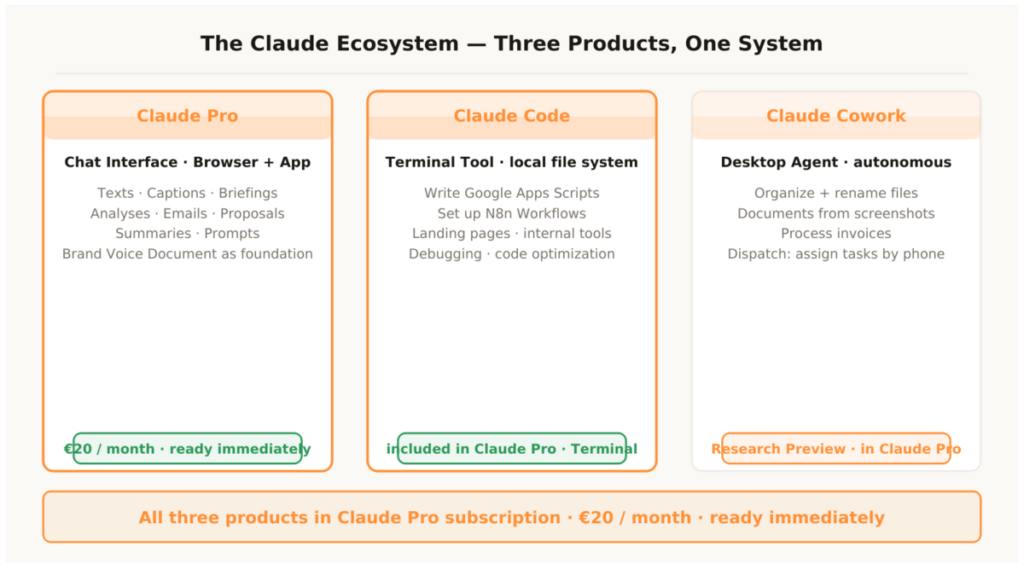
Before diving into the concrete application areas, it’s important to understand what each of the three Claude products does — and when which one is the right tool.
1.1 Claude Pro — The AI Thinking and Writing Partner
Claude Pro is the browser- and app-based chat interface. €20 per month, access to all current Claude models, unlimited use for texts, analyses and briefings. Claude Pro is the starting point for all text-based automations: creating briefings, email copy, captions, summaries, analyses, decision templates, proposals.
Two things distinguish Claude Pro from other AI chat interfaces. First, the quality of context understanding: Claude Pro processes long, complex documents without losing quality. A complete contract, a 30-page briefing, an extensive brand voice document — Claude Pro reads everything and responds to it consistently. Second, the reliability in following instructions: Claude follows precise prompts more consistently than any other AI model. Anyone who has built a solid prompt system with a brand voice document gets reproducible results every time.
1.2 Claude Code — The AI Developer
Claude Code is Anthropic’s terminal-based coding tool. No browser, no chat interface — but a command-line app that works directly with the local file system. Claude Code reads code, writes code, runs tests, debugs, creates complete projects and builds automation scripts on your own machine.
For entrepreneurs without programming knowledge, Claude Code is the game-changer. What used to keep a developer busy for two days — a Google Apps Script for invoice automation, an N8n workflow setup, a simple landing page — Claude Code handles on demand in minutes. Claude Code works directly on the local machine: it reads existing files, edits them, creates new ones and runs scripts. No more copy-paste between chat and editor — Claude Code builds it directly.
1.3 Claude Cowork — The AI Desktop Agent
Claude Cowork is the newest and most far-reaching product in the Claude ecosystem. Anthropic launched Cowork in January 2026 as a Research Preview — as an AI agent that autonomously executes desktop-based tasks for non-technical users. It runs in the Claude Desktop App and gives Claude direct, permission-based access to local folders: Claude can read, edit and create files.
Claude Cowork isn’t a chat — it’s an autonomous agent. You describe a task, Cowork handles it independently: organizing files, generating documents from screenshots, creating reports from scattered notes, converting receipts into structured spreadsheets. In April 2026 Cowork was extended to Windows, including a Dispatch feature that allows you to assign tasks to Claude from your smartphone — and find them finished on the desktop without any manual steps on the PC.
Honest assessment: Cowork is still Research Preview. For structured, clearly defined tasks with non-sensitive data, it already works very well. Anthropic recommends not using Cowork together with applications that process sensitive data. Anyone using Cowork today should start with clearly defined, bounded tasks — and get to know the tool before it’s embedded in critical workflows.
Area 01 – Automating Marketing with Claude
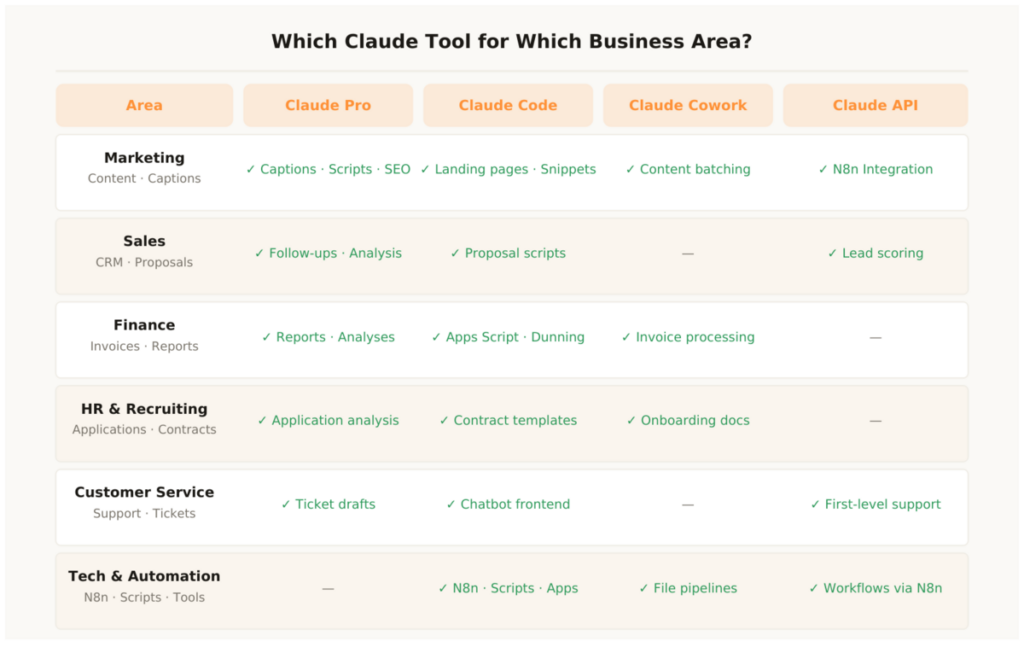
Marketing is the area where Claude delivers the fastest and most visible ROI. Claude Pro is already described as the central AI core in all the marketing automation articles on this website — here’s the complete overview in one place.
2.1 Content Production with the Brand Voice System
The foundation is the brand voice document: one page containing tone, forbidden words, target audience, typical phrasings and three example texts from top performances. This document goes into every Claude prompt. The result: every generated text sounds like the brand — not like a generic AI response.
With this foundation, Claude Pro handles the entire text production: YouTube scripts, blog post first drafts, TikTok captions, Instagram captions, LinkedIn posts, newsletter copy, email sequences, ad copy. Every format that follows a defined pattern is automatable with Claude Pro. The complete workflows for the three major video platforms are documented in the articles YouTube Automation – Complete Strategy: Tools & Workflows, Instagram Automation – Complete Strategy: Workflows and Tools and TikTok Automation – Complete Strategy: Workflows and Tools.
2.2 SEO Content Workflow
Keyword from Ahrefs → briefing in Claude Pro (structure, key messages, semantic keywords) → first draft in Claude Pro → review and additions by the expert → on-page check in Yoast. Claude handles 70 to 80 percent of the writing work — the remaining 20 to 30 percent are personal experiences, current data and the content positioning. This portion is decisive: it makes the difference between a generic AI article and an article that ranks.
2.3 Keyword Research and Briefing Automation
Claude Pro doesn’t just handle the writing — it handles the preparation too. From a keyword and a target audience description, Claude Pro creates a complete content brief in under five minutes: article structure, main sections, semantically related keywords, target audience objections, recommended internal links. What used to be two hours of research is now a single prompt. The author takes the brief and adds personal experiences, current data and their own positioning — everything else is already there.
2.4 Content Batching with Claude Cowork
Claude Cowork can autonomously process entire content batches. Example task for Cowork: analyze a folder with ten raw scripts, create five caption variants for different platforms from each script, save all captions in a structured Google Sheets file sorted by platform. Cowork handles this task completely autonomously — while you work on something else or are out and about, having delegated the task via the Dispatch feature from your smartphone.
The brand voice document is the most important investment in the Claude stack. One page is enough: tone (direct, you-address, no filler phrases), forbidden words (never: “exciting,” “revolutionary,” “unique”), target audience (entrepreneurs, SMEs, 30–50), three example texts from top performances. This document goes into every prompt — and turns Claude from a generic text generator into a brand voice system. Created once, used permanently.
Area 02 – Automating Sales and CRM with Claude
In sales, Claude is the bridge between raw CRM data and personally-sounding communications. No sales process that requires repetitive texts, follow-ups or documents needs to run manually.
3.1 Proposals and Contracts with Claude Code
Claude Code creates complete proposal and contract scripts on demand — including variable placeholders, Google Apps Script integration for automatic PDF generation and N8n webhook triggers for automatic sending. What a developer used to build over two days is now a prompt and thirty minutes of work with Claude Code.
A concrete prompt: “Write a Google Apps Script that automatically generates a proposal as a Google Doc from a Sheets template, fills all placeholders with the row data, exports it as PDF and sends it by Gmail to the address in column D.” Claude Code delivers the finished script including error handling, logging and setup instructions — production-ready, ready to deploy immediately.
3.2 Personalized Follow-up Sequences
Claude Pro writes personalized follow-up emails based on CRM data: company name, industry, last touchpoint, specific pain point. The difference from generic templates is measurable — recipients respond to emails that feel like they were written by a human who knows their situation. Claude makes this scalable: a hundred personalized emails have the same effort as one.
3.3 Lead Analysis and Prioritization
Claude Pro analyzes incoming leads based on form data and email content and provides a structured assessment: purchase readiness, relevant hook, recommended next step. N8n triggers this analysis automatically for every new lead — sales receives a prepared assessment instead of raw data. The complete sales automation stack is documented in the article Business Automation – Complete Strategy for SMEs.
Area 03 – Automating Finance and Operations with Claude
Finance and operations are the areas where Claude Code has the biggest technical leverage — and where Claude Cowork delivers the greatest autonomous value.
4.1 Invoice Processing with Claude Cowork
Claude Cowork can fully autonomously process incoming invoices from a defined folder: read PDF, extract invoice data (issuer, amount, date, due date), enter into a Google Sheets tracking table and categorize. What used to be manual reviewing and typing runs as an autonomous Cowork task completely automatically — including error logging for illegible or incomplete documents.
4.2 Google Apps Scripts with Claude Code
Claude Code writes all Google Apps Scripts on demand: invoice generation, payment tracking, automatic dunning, financial reporting, project folder creation. The difference from traditional development: no developer, no agency, no waiting time. Claude Code delivers production-ready scripts in minutes. How this looks in practice is described in detail in the article Google Workspace Automation – What You Can Automate with Google Apps Script, Sheets, Drive and More.
4.3 Financial Reports and Analyses
Claude Pro analyzes financial data, creates monthly reports, identifies outliers and formulates recommendations — based on data passed via file upload or copy-paste. What an accountant or controller used to spend several hours on for standard reporting is done with Claude Pro in twenty minutes. Not as a replacement for the accountant — but as preparation that significantly reduces accountant time and thus accountant costs.
Area 04 – Automating HR and Recruiting with Claude
5.1 Application Analysis with Claude Pro
Upload the CV, provide the job description, Claude Pro analyzes: core competencies, years of experience, relevant strengths, possible gaps, fit for the role on a scale with reasoning. What used to cost 15 to 20 minutes per application now takes thirty seconds. With twenty applications per posting that’s a time saving of five to six hours — per role, per recruiting round.
5.2 Contracts and Documentation with Claude Code
Claude Code generates complete job descriptions from a short briefing, creates contract templates with variable placeholders and builds the Google Apps Script integration for automatic contract generation. Built once, used permanently — for every new role, every new employee, without manual adjustment.
5.3 Onboarding Documentation with Claude Cowork
Claude Cowork can automatically create structured onboarding documentation from a folder of existing company documents: extract relevant processes from different sources, convert them into clear step-by-step instructions, save them in a defined format as a document. What used to be days of HR effort, Cowork handles autonomously in hours.
Area 05 – Technical Automation with Claude Code
Claude Code is the most powerful tool in the Claude ecosystem for technically-oriented automations — and the area that makes the biggest difference for entrepreneurs who have previously been blocked by developer costs.
6.1 Setting Up N8n Workflows with Claude Code
Claude Code can write complete N8n workflow configurations — as a JSON export that can be imported directly into N8n. A prompt like “Write an N8n workflow that enters data into HubSpot and sends a Slack notification on every new Google Forms submission” delivers a finished workflow definition that you simply import into N8n. Claude Code knows N8n syntax, node structures and webhook configurations. Anyone not yet familiar with N8n will find the complete setup guide in the article N8n Automation – All Areas You Can Automate with It.
6.2 Landing Pages and Web Tools
Claude Code creates complete, responsive landing pages in HTML/CSS — optimized for conversions, with all necessary sections, ready to copy into WordPress or deploy directly. What used to keep a designer and developer busy for a week, Claude Code delivers in under an hour. Beyond that, Claude Code builds internal tools: simple dashboards, calculators, data visualizations, micro-SaaS products — all on demand, in natural language, without programming knowledge.
6.3 Apple Scripts on Demand
Anyone automating the Apple ecosystem occasionally needs Apple Scripts for more complex Mac automations. Claude Code writes these scripts on demand — immediately, production-ready, with error handling. A prompt like “Write an Apple Script that moves all files in the Downloads folder older than 30 days to the Archive folder” delivers the finished script in seconds. The complete Apple automation strategy is documented in the article Apple Automation – How Entrepreneurs Put iPhone, iPad and Mac to Work for Them.
6.4 Debugging and Code Optimization
Claude Code reads existing code — whether self-written, delivered by a developer or found online — and explains what it does, identifies errors, optimizes performance and adds new functions. Anyone with existing automations that aren’t working correctly gives Claude Code access to the code and describes the problem. Claude Code finds the error, explains it clearly and delivers the corrected version.
This fundamentally changes the dynamic between entrepreneurs and technical service providers. Anyone who previously had to wait for a developer to add a feature to an existing script can now give Claude Code the requirement and test the result in minutes. Dependency on external developers for standard automation tasks is a thing of the past for most SMEs with Claude Code.
Area 06 – Automating Customer Service with the Claude API
7.1 AI First-Level Support
The Claude API can be embedded as an intelligent first-level support agent on any website. Claude Code builds the frontend — a chat interface in the corporate identity — and the backend integration that connects Claude with the company’s knowledge base. The result isn’t a rule-based FAQ bot, but an AI agent that understands context, answers questions even when phrased differently from the FAQ, and responds in 70 to 80 percent of cases without human escalation.
7.2 Ticket Classification and Reply Drafts
N8n passes incoming support tickets to the Claude API. Claude classifies by topic and urgency, writes a first reply draft in the style of the brand voice document and recommends the next step. The support employee sees a prepared ticket instead of a raw customer email. Processing time per ticket drops from ten to two minutes — at consistent reply quality, because Claude hits the brand’s tone consistently.
- Week 1: Subscribe to Claude Pro, write brand voice document — foundation for all texts
- Week 2: Install Claude Code, have it write your first Google Apps Script on demand
- Week 3: Set up N8n, embed Claude API as a node in the first workflow
- Week 4: Activate Claude Cowork, test first autonomous task with non-sensitive data
- Month 2: Switch all content production workflows to Claude Pro
- Month 3: Deploy Claude Code for all technical automations in the stack
The Complete Claude Stack
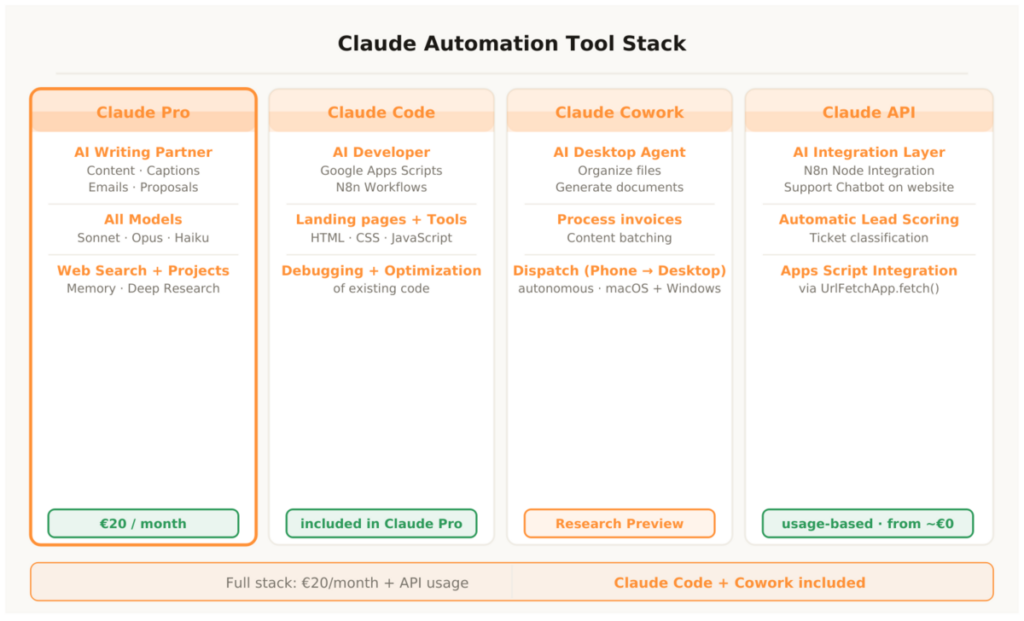
Total cost: €20/month for Claude Pro — Claude Code and Cowork are included. The API is billed usage-based and stays under €30/month at typical SME volume. No other AI system delivers this range of functions at this price.
Claude Pro (€20/month)
1. Texts and Content
Captions, scripts, emails, proposals, briefings, SEO articles — all based on the brand voice document. Cost: €20/month, Claude Code and Cowork included. Time savings: 8–15 hours per week depending on content volume. Setup: immediately. Bottom line: The most important first step — no functioning AI stack without Claude Pro.
2. Analyses and Decision Templates
Application analyses, lead assessments, financial reports, market analyses — Claude Pro processes long documents and delivers structured summaries and recommendations. Setup: immediately. Bottom line: Reduces analysis effort from hours to minutes.
Claude Code (included in Claude Pro)
3. Scripts and Automations
Google Apps Scripts, N8n workflows, Apple Scripts, Bash scripts — all on demand in natural language, production-ready including error handling. Setup: terminal installation, 10 minutes. Bottom line: Makes developer work accessible to every entrepreneur.
4. Landing Pages and Tools
Complete responsive landing pages, internal dashboards, calculators, micro-SaaS products — created directly on the local machine. Setup: in the terminal. Bottom line: One hour of Claude Code replaces one week of agency work.
Claude Cowork (Research Preview · included in Claude Pro)
5. Autonomous Desktop Tasks
Organize files, generate documents from screenshots, process invoices, create content batches — fully autonomous, also triggerable via Dispatch from the smartphone. Setup: Claude Desktop App, folder permissions. Bottom line: Already productively usable today for clearly defined tasks with non-sensitive data.
Claude API (usage-based)
6. Automated Integrations
N8n node for Claude, support chatbot on the website, lead scoring workflows, ticket classification — every automated Claude integration outside the desktop apps runs via the API. Cost: usage-based from approx. €0.003/1,000 tokens. Bottom line: The foundation for all automated Claude workflows in the business stack.
Claude Automation – The Most Important Questions
What’s the difference between Claude Pro, Claude Code and Claude Cowork?
Claude Pro is the chat interface for text-based tasks — writing texts, analyzing, summarizing. Claude Code is the terminal tool for technical automations — building scripts, workflows, landing pages directly on the machine. Claude Cowork is the desktop agent that autonomously executes tasks on your own machine — without you having to do every step yourself. All three share the same AI model; the difference lies in the interface and the degree of access to the local system.
Do I need programming knowledge for Claude Code?
No. Claude Code works with natural language: you describe what you need, Claude Code builds it. Basic understanding of how to open a terminal and run a command is fully sufficient. For most use cases — Google Apps Scripts, N8n workflows, simple landing pages — no further technical knowledge is needed.
How do I connect Claude to my existing tools?
Via the Claude API and N8n. N8n has a native Anthropic node that embeds Claude directly into any workflow. For Google Workspace, Claude Code uses Google Apps Script as a bridge — the language speaks directly with Sheets, Drive, Gmail and Calendar. The complete N8n setup guide is in the article N8n Automation – All Areas You Can Automate with It, the Google Workspace guide in the article Google Workspace Automation.
What does the complete Claude stack cost per month?
€20/month for Claude Pro — Claude Code and Cowork are included. The Claude API is billed usage-based and stays under €30/month additional at typical SME volume. Total: €20–50/month for the complete stack. No other AI system delivers this range of functions at this price. At an hourly rate of €50, Claude Pro pays for itself through the first saved working hour in the first week.
Is Claude Cowork already production-ready?
Claude Cowork is Research Preview — it’s already productively usable for clearly defined, bounded tasks with non-sensitive data. For critical processes or data requiring special confidentiality, Anthropic itself recommends caution. The right approach: start with simple, reversible tasks, get to know the tool, then integrate it step by step into the stack. Cowork is developing fast — what is Research Preview today will be stable production functionality in a few months.
What can Claude not do?
Claude cannot make decisions that require genuine judgment, empathy or strategic experience. Claude doesn’t replace relationships, negotiation or creative core ideas. Claude accelerates all processes that have a defined input and a defined output. What is unstructured, situational or human — that stays with the human. The combination of human strategy and Claude execution is stronger than either alone. This is where automation tools and human expertise work together at their best.
Claude is the only AI system that can simultaneously be used as a writing partner, as a developer and as an autonomous desktop agent — in a single subscription, on all devices, for all business areas. Anyone who understands and combines all three products has an AI stack that is more deeply integrated into daily work than any other tool in the stack — and still remains the cheapest single item. That’s the strength of the Claude ecosystem: not a feature, but a complete system.
This article is updated regularly. Claude is developing fast — new products, new capabilities and updated practical examples flow directly in here.