Marketing Automation – Complete Strategy: Systems, Tools and Workflows (−80% Manual Effort)
by Sebastian Voppmann
Marketing costs time. Not because marketing is hard — but because most of it is repetitive. Writing emails, scheduling social media posts, following up on leads, optimizing ads, publishing content, responding to comments. Anyone doing all of this manually is working in marketing instead of on marketing. That difference is decisive.
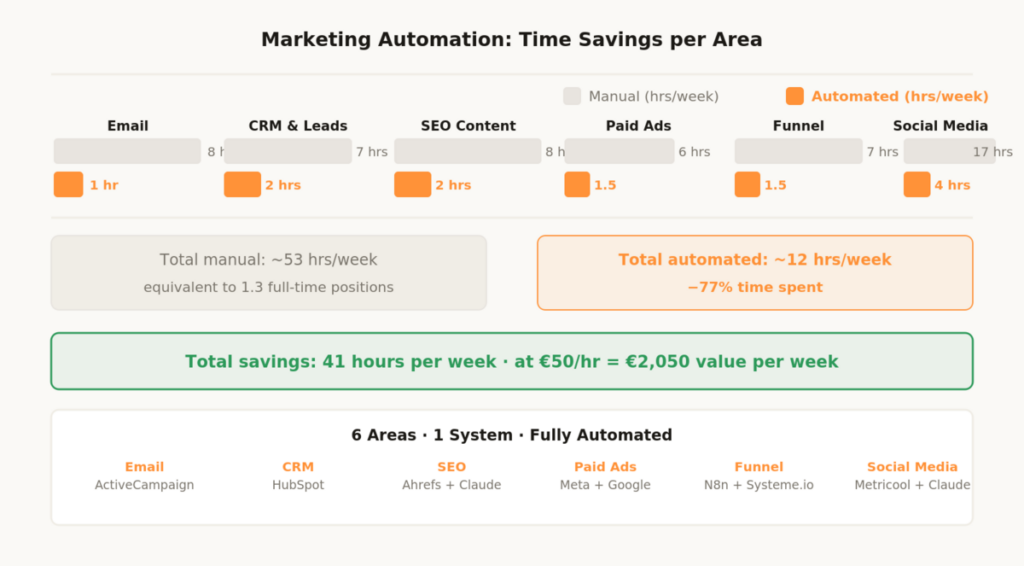
Marketing automation is not a trend and not a tool. It’s a strategic decision: which parts of marketing run automatically, and which require human judgment? Anyone who draws that line once and builds the system accordingly reduces manual marketing effort by 70 to 80 percent — without being less visible, without communicating less, and without losing quality.
This article gives a complete overview of all areas of marketing automation: email, CRM, SEO content, paid ads, funnel and social media. For each area we show what can be automated, which tools deliver the highest ROI and where the limits of automation lie. The deep-dive on each individual social media channel — YouTube, Instagram, TikTok — can be found in the linked specialist articles.
What Marketing Automation Really Means
Marketing automation doesn’t mean machines take over your marketing. It means repetitive, rule-based tasks are handled by systems — while you focus on strategy, creativity and decisions that require real thinking.
The distinction matters because many companies apply marketing automation incorrectly: they automate the wrong things (generic email blasts instead of personalized sequences), deploy the right tools without a strategy (CRM without defined lead stages) or automate too early (before a manual process even works).
A proven rule: automate what you’ve understood manually first. An email funnel that converts manually will work better when automated. An email funnel that doesn’t convert manually will just fail faster when automated. That sounds obvious — but it’s the most common mistake when building marketing automation systems.
The second principle: automation doesn’t replace a voice. Every automated touchpoint — email, social post, ad — has to sound like the brand, not like a machine. Templates, brand voice documents and clear style guidelines are therefore not optional extras, but the prerequisite for automation that works. AI writes the first draft. The brand gives it a voice.
Automatable: all rule-based, repetitive tasks — email sequences triggered by defined events, social media scheduling, lead scoring based on behavior, ad bid adjustments based on performance data, content distribution across multiple channels, reporting and analytics summaries. Not automatable: all tasks requiring genuine creativity, empathy or situational judgment — the strategic direction of a campaign, the creative decision behind a hook, personal handling of a dissatisfied customer, the positioning of a brand. The line isn’t always sharp — but it’s always there.
Area 01 – Email Marketing Automation
Email is still the channel with the highest ROI in digital marketing — on average €36 return per euro invested. At the same time, email marketing is the area where automation is most underestimated. Most companies send newsletters — but very few have a complete automation system with defined triggers, sequences and lead scoring.
1.1 The Three Core Sequences of Every Email System
Three automated sequences cover 80 percent of the email automation potential. First sequence: the welcome sequence. Every new subscriber automatically goes through a three-to-five-part sequence that introduces the brand, delivers the greatest value and invites a first action. Once built, this sequence runs permanently — for every new subscriber, every day, without manual effort. Anyone gaining 100 new subscribers per month has 100 personalized communication journeys running in parallel.
Second sequence: the lead nurturing sequence. Leads who are not yet ready to buy automatically receive content that gradually warms them up. Trigger: download of a lead magnet, visit to a specific page, interaction with a specific social post. Length: five to ten emails over three to four weeks. Goal: increase purchase readiness without annoying the lead.
Third sequence: the re-engagement sequence. Inactive subscribers who haven’t opened an email in 60 or 90 days receive an automatic re-engagement sequence — two to three high-value emails, followed by automatic list pruning. Clean lists perform better because they improve deliverability. A pruned list of 2,000 active subscribers beats an unmaintained list of 10,000 inactive contacts on every relevant metric.
1.2 Tools for Email Automation
ActiveCampaign is the standard for mid-sized email lists with complex automation requirements. Visual workflow builder, lead scoring, CRM integration and site tracking in one system. Cost from €29/month — pays off from a list of 500 active subscribers with a defined funnel.
Klaviyo is the first choice for e-commerce businesses. Direct Shopify and WooCommerce integration, automatic abandoned cart sequences and purchase-based segmentation out of the box. For pure content or service businesses, ActiveCampaign is the better choice.
MailerLite is the most affordable option for simple automation workflows. Free up to 1,000 subscribers, intuitive interface, all core features for getting started. When the list grows and automation requirements increase, switching to ActiveCampaign makes sense.
Claude Pro complements every one of these platforms as the content layer: email copy based on the brand voice document, subject line variations for A/B tests, personalization snippets and segmentation logic. The copy comes from Claude, the sending runs through the platform. The combination of AI-generated first draft and human finalization halves copy creation time without sacrificing quality.
Anyone starting with email automation should prioritize exactly one sequence: the welcome sequence. Not the newsletter, not the sales sequence — the welcome sequence. It runs permanently for every new subscriber, has the highest open rate of any email type (often 50–70%) and makes the first impression. Three emails over seven days are enough to start. Once built, it runs permanently — without a single manual step.
Area 02 – CRM and Lead Nurturing
A CRM without automation is an expensive database. A CRM with automation is a revenue machine. The difference isn’t in the tool — it’s whether the CRM actively responds to behavior or passively collects data. Most companies use their CRM as a digital address book. That’s a waste of both budget and potential.
2.1 Lead Scoring: Setting Priorities Automatically
Lead scoring is the practice of automatically prioritizing leads based on their behavior. A lead who has visited the pricing page three times, requested a demo and opened two emails is closer to buying than a lead who downloaded a free guide three weeks ago. The CRM should recognize this automatically — and act accordingly.
ActiveCampaign and HubSpot offer lead scoring out of the box. Define once which actions score how many points: page visit five points, email open two points, pricing page visit twenty points, demo request fifty points. The CRM automatically totals these and, when a threshold is reached, triggers a sales notification — or directly a sales sequence. No lead falls through the cracks anymore.
2.2 Pipeline Automation
Every stage in the sales pipeline should trigger automated actions. Lead becomes prospect: automatic welcome email and invitation to an introductory call. Proposal sent: automatic follow-up email after 48 hours without reply. Deal won: automatic onboarding sequence starts immediately. Deal lost: automatic re-engagement sequence starts after 30 days.
These pipeline automations cost a one-time investment of two to three hours setup — and then run permanently, for every lead, without manual effort. The effect isn’t just time savings: automated follow-ups have higher consistency than manual ones — because no lead is forgotten, no follow-up comes too late and no message is written in the wrong tone.
Area 03 – SEO Content Automation
SEO content automation doesn’t mean an AI automatically publishes articles. It means the repetitive parts of the content process — research, briefing, first draft, on-page optimization — are accelerated by tools and templates, while the substantive core comes from the expert. A well-automated SEO process produces more content in less time without losing quality.
3.1 Automating Keyword Research and Content Planning
Ahrefs or Semrush automatically deliver new keyword ideas based on seed keywords, competitor rankings and monthly search volumes. Once a keyword cluster is defined, the tool permanently generates new topic ideas — without manual research. Monthly effort for keyword research drops from four to five hours down to thirty minutes.
The workflow: thirty minutes in Ahrefs monthly, select keyword cluster for the next month, enter into Notion as a content pipeline. Claude Pro creates a complete content brief based on the keyword, search intent and brand voice document — including structure, key messages and semantically related keywords. The brief takes five minutes instead of two hours.
3.2 Content Creation and On-Page Optimization
Claude Pro writes an article first draft based on a solid brief in under ten minutes. This first draft is 70 to 80 percent done — it needs personal examples, current data, first-hand experience and a final quality check. These twenty to thirty percent come from the expert and make the difference between a generic AI article and an article that actually ranks and converts.
On-page SEO checks run automatically through Yoast SEO in WordPress or Surfer SEO — both show in real time whether keyword density, meta description, heading structure and internal linking are correct. No more manually checking against an SEO checklist.
Content distribution runs automatically after publication: every new blog post triggers an email summary to the newsletter list, social media posts on all connected platforms via Metricool and an internal notification via Notion or Slack. The article is published once — and automatically distributed across all channels.
Area 04 – Paid Ads Automation
Paid ads automation is the area where the platforms themselves do the most. Meta and Google have made massive AI investments in their bidding strategies and audience algorithms. Anyone still manually bidding and manually optimizing is losing to competitors using automated bidding strategies — not because they’re better, but because the algorithm processes more data than any human ever could.
4.1 Meta Ads: Advantage+ and Automatic Optimization
Meta’s Advantage+ Campaign Budget Optimization automatically distributes budget across the best-performing ad sets — no more manual reallocation. Advantage+ Placements automatically places ads where the algorithm expects the best performance: feed, stories, reels, audience network.
The only thing the marketer still controls: the creative (image, video, copy) and the strategic direction (audience, offer, objective). Meta handles operational optimization entirely. This shift — away from manual bidding, toward creative strategy — is the most important behavioral change for Meta advertisers. Anyone still spending time on manual placement and bid optimization is investing it in the wrong place.
4.2 Google Ads: Smart Bidding and Performance Max
Google’s Smart Bidding (Target ROAS, Target CPA, Maximize Conversions) sets bids in real time based on hundreds of signals that aren’t accessible to human optimization: device, time of day, location, search query context, user history, browser type. Manual CPC bidding is no longer the best strategy for most campaigns — the AI simply optimizes better than any human.
Performance Max Campaigns go a step further: they automatically distribute budget across all Google channels (Search, Display, YouTube, Shopping, Discovery) and optimize for conversions. The marketer supplies assets — copy, images, videos — and Google handles placement, bidding and targeting entirely. Campaign management effort drops from several hours per week to a thirty-minute weekly review.
4.3 Automating Reporting with Looker Studio
Manual ads reporting costs one to two hours per week — taking screenshots, transferring numbers, updating spreadsheets. Looker Studio connects directly with Meta Ads, Google Ads, Google Analytics and other data sources, and automatically creates a dashboard that updates in real time. One-time setup of two to three hours — then zero manual reporting effort. Open the dashboard, look for five minutes, make a decision, done.
Area 05 – Funnel Automation
A funnel is the defined sequence of touchpoints that turns a prospect into a buyer. Without automation, a funnel is a manual process — sending emails by hand, writing follow-ups yourself, personally chasing leads. With automation, the funnel runs 24 hours, 7 days a week, for any number of leads simultaneously. An automated funnel scales without proportionally costing more time.
5.1 The Three Funnel Stages and Their Automation
Top of Funnel — Awareness: content marketing, SEO and paid ads bring visitors to the website. This happens largely automatically — SEO articles rank permanently, ads run automatically, social media posts are scheduled and published. Manual effort lies in the one-time setup and monthly optimization.
Middle of Funnel — Consideration: lead magnet is delivered automatically, welcome sequence starts automatically, lead scoring runs in the background. The lead moves through the funnel — without anyone manually intervening. Retargeting ads automatically re-engage site visitors who didn’t convert.
Bottom of Funnel — Conversion: when a defined lead score threshold is reached, the CRM automatically triggers a sales notification or a sales sequence. Checkout abandoners automatically receive an abandoned cart sequence. Buying customers automatically enter an onboarding sequence that reduces churn and prepares upselling.
5.2 Automation Middleware: N8n
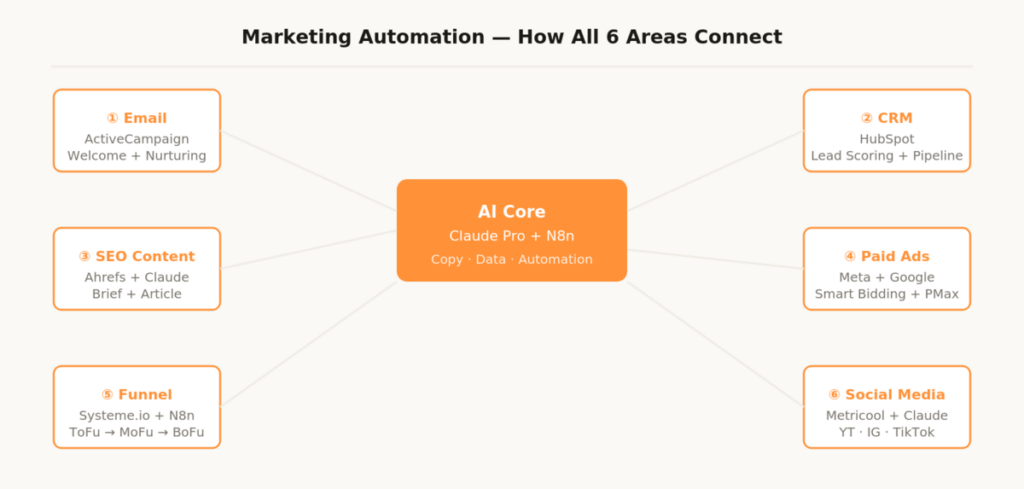
N8n is the automation middleware that connects all marketing tools together. An example workflow: new lead form submission on the website → lead data automatically in HubSpot → welcome email in ActiveCampaign → Slack notification to sales → task created in Notion. This workflow runs fully automatically, without anyone manually transferring a record.
N8n runs self-hosted on a VPS (free) or as N8n Cloud (from €20/month) and is more powerful than any paid no-code alternative. With a basic understanding of data structures and webhooks, complex multi-tool workflows can be built without coding knowledge. The complete setup guide can be found in the article N8n Automation – Workflows, Setup and Practical Examples.
- Month 1: Email system — welcome sequence, lead magnet sequence, choose and set up platform
- Month 2: CRM — define pipeline, set up lead scoring, build first pipeline automations
- Month 3: Social media scheduling — set up Metricool, build content calendar, establish batching workflow
- Month 4: SEO content — keyword pipeline in Notion, Claude brief prompt, automate distribution
- Month 5: Paid ads — activate Smart Bidding, set up Looker Studio dashboard, build creative testing system
- Month 6: Funnel middleware — set up N8n, connect all tools, automate data flows
Area 06 – Social Media Automation
Social media is the most visible area of marketing automation — and at the same time the one where most mistakes are made. Automated engagement (bot comments, fake likes, mass follows) is not only against the terms of service of all platforms, but also counterproductive for algorithmic ranking. What can be legitimately and effectively automated: content planning, production, scheduling, distribution and community flows.
The complete workflows for the three largest video platforms are documented in separate articles — with concrete tool stacks, step-by-step instructions and real time savings figures from practical use.
6.1 YouTube Automation
YouTube content requires the highest production effort of any platform — but also the highest automation leverage. From 22 hours manually down to under 4 hours per video: through AI scripting with Claude, edit templates in Adobe Premiere, automatic pause removal with Gling and fully automated upload via N8n workflow including AI-generated metadata. The complete system setup — phase by phase, tool by tool — can be found in the article YouTube Automation – Complete Strategy: Tools & Workflows (−87% time savings).
6.2 Instagram Automation
Instagram lives on visual consistency and daily presence. The automation system covers all five production phases: content strategy with Claude and Flick, visual production with Canva templates and CapCut, caption system with brand voice templates, auto-publishing with Later and community flows with ManyChat for comment-to-DM automations. Time savings: from 17 hours down to under 4 hours per week. The complete workflow can be found in the article Instagram Automation – Complete Strategy: Workflows and Tools (−75% time spent).
6.3 TikTok Automation
TikTok rewards frequency — daily one to three videos is the reality for growing accounts. The system makes this possible with 4 to 5 hours per week: weekly plan with Claude and TikTok Creative Center, batch production with CapCut templates, caption automation, native scheduling in Creator Studio and cross-distribution via Repurpose.io to four platforms simultaneously. The complete stack can be found in the article TikTok Automation – Complete Strategy: Workflows and Tools (−72% time spent).
6.4 Cross-Platform Automation
Metricool coordinates scheduling across all platforms in a single dashboard — TikTok, Instagram, YouTube, LinkedIn, Pinterest, Twitter/X. Repurpose.io automatically distributes a video produced once across all connected platforms: one video, up to six platforms, zero additional manual effort after setup. Claude Pro is the AI core for content planning, caption generation and hashtag strategy across all platforms — one brand voice document that delivers consistent results on all channels.
The Complete Marketing Automation Stack
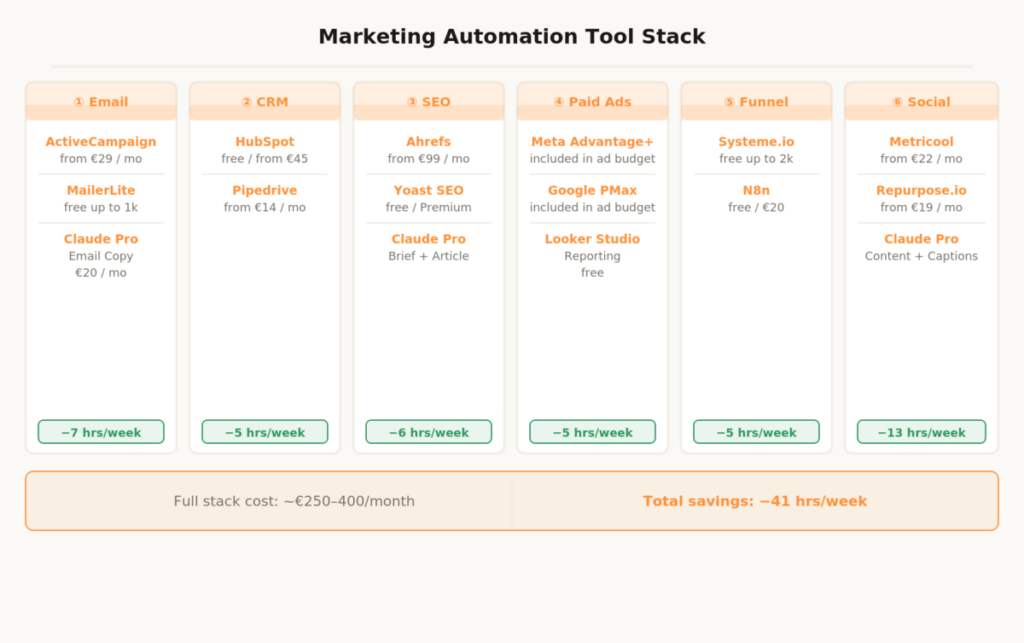
This stack is modular — not every tool is needed by every business. The prioritization shows where to start.
Email & CRM
1. ActiveCampaign
Email automation, lead scoring, CRM and site tracking in one system. Visual workflow builder for all sequences without code. Cost: from €29/month. Time savings: 7 hours per week. Setup: moderate. Bottom line: Highest ROI of any marketing automation tool — the first tool every business with an email list should set up.
2. HubSpot CRM
Pipeline management, deal tracking and core automations. Free plan covers all essential features to get started. Cost: free / from €45/month. Time savings: 5 hours per week. Setup: easy. Bottom line: Free plan is fully sufficient for most small and mid-sized businesses.
SEO & Content
3. Ahrefs
Keyword research, competitor analysis and automatic content ideas based on defined topic clusters. Cost: from €99/month. Time savings: 4 hours per month. Setup: moderate. Bottom line: Only relevant when SEO is an active growth channel — then indispensable.
4. Claude Pro
Brief creation, content first drafts, email copy and caption generation for all channels based on the brand voice document. Cost: €20/month. Time savings: 8–12 hours per week across channels. Setup: moderate. Bottom line: The single most important tool in the entire marketing automation stack.
Paid Ads & Reporting
5. Looker Studio
Automatic real-time dashboard for Meta Ads, Google Ads, Analytics and all other data sources. Cost: free. Time savings: 1–2 hours per week. Setup: moderate. Bottom line: Set it up once — never do manual reporting again.
Funnel & Middleware
6. N8n
Connects all marketing tools and automates data flows — self-hosted free, as N8n Cloud from €20/month. New lead in form → automatically in ActiveCampaign, HubSpot and Slack. New article → automatically newsletter, social posts, internal notification. The complete N8n workflow guide can be found in the article N8n Automation – Workflows, Setup and Practical Examples. Cost: free (self-hosted) / from €20/month Cloud. Time savings: 3–5 hours per week. Setup: moderate. Bottom line: The glue between all other tools in the stack — more powerful and cheaper than any paid alternative.
7. Systeme.io
Landing pages, email automation, funnel builder and membership area in one system — free up to 2,000 contacts. Cost: free / from €27/month. Time savings: 3–4 hours per week. Setup: easy. Bottom line: Best entry point for complete funnel automation without a large budget.
Social Media
8. Metricool
Cross-platform scheduling, analytics and best-time optimization for all social channels in one dashboard. Cost: free / from €22/month. Time savings: 3 hours per week. Setup: very easy. Bottom line: Replaces five separate tool logins with one central dashboard.
9. Repurpose.io
Automatic cross-distribution of video content to up to six platforms after a single upload. Cost: from €19/month. Time savings: 2–3 hours per week. Setup: very easy. Bottom line: Multiplies reach without proportional additional effort.
Full stack total cost: €250–400/month depending on configuration. Minimum version — Claude Pro, ActiveCampaign, HubSpot Free, Metricool Free, N8n self-hosted (free) — under €50/month. The minimum version covers email automation, core CRM functions, social scheduling and tool connections and already delivers the majority of the time savings.
Marketing Automation – The Most Important Questions
Where should I start with marketing automation?
With email. The welcome sequence for new subscribers is the highest-ROI automation in all of marketing — it runs permanently, without extra effort and converts leads while you sleep. Second priority: a simple CRM with lead scoring. Third priority: social media scheduling. In that order, not simultaneously. Anyone building everything in parallel builds everything half-finished.
How much budget do I need for marketing automation?
Getting started is possible with under €50/month: Claude Pro (€20), ActiveCampaign Lite (€29), HubSpot Free (€0), Metricool Free (€0), N8n self-hosted (€0). This stack covers email automation, core CRM functions, social media scheduling and first tool connections. At an hourly rate of €50, even the full stack pays for itself through the first week of saved work.
Can I implement marketing automation without technical knowledge?
For 80 percent of the automations described: yes. ActiveCampaign, HubSpot, Metricool, Later and Systeme.io have intuitive drag-and-drop interfaces without coding. N8n enables complex tool connections with a basic understanding of data structures and webhooks. For simple workflows, quickly learnable basic know-how is enough — the N8n community and Claude Code help with more complex setups.
How long does the full build take?
Realistically two to three months for the complete stack — not because of technical complexity, but because of the strategic groundwork. Every automation needs a decision basis: which email sequence, which lead score threshold, which caption structure. Recommendation: one area per month, fully built and tested, before the next one is added.
What’s the biggest mistake in marketing automation?
Too much at once. Setting up ten tools in parallel, without having truly understood a single process, leads to half-finished setups that cost more time than they save. The right approach: understand one process manually, automate it, test it, optimize it — then the next. Automation accelerates processes that work. It doesn’t fix broken ones.
How do I measure the ROI of marketing automation?
Three metrics are enough: hours saved per week multiplied by the hourly rate gives the monetary value of the time savings. The email conversion rate of automated sequences is directly measurable in ActiveCampaign or Klaviyo — compare before and after automation. The lead-to-customer rate in the CRM shows whether the nurturing system works. Anyone tracking these three metrics monthly has a complete automation ROI overview — without a separate reporting tool.
This article is updated regularly. New tools, better workflows and updated costs flow directly in here.