Instagram Automation – Complete Strategy: Workflows and Tools (−75% Time Spent)
by Sebastian Voppmann
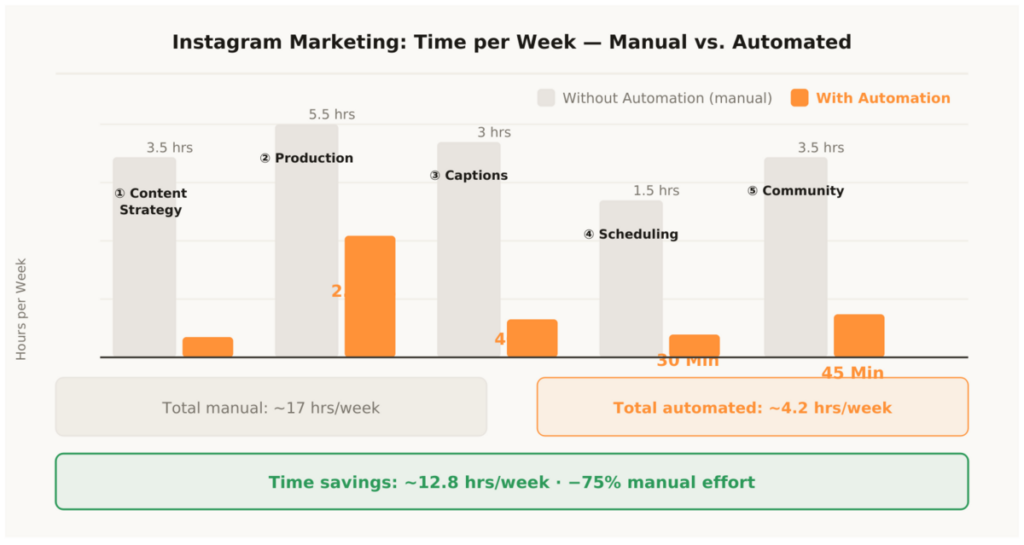
Instagram marketing typically costs 16 to 20 hours per week — when you do everything manually. Research, copywriting, creating graphics, editing videos, finding hashtags, posting, commenting, answering DMs. Anyone who consistently combines this with the right Instagram automation stack can get that effort down to under 4 hours. Not through lower quality, but through smarter processes.
This article shows what a complete workflow actually looks like — with real tools, real time savings and a phase system you can implement immediately. Each phase is clearly defined: what you can automate, which tools you need and how the process works in practice. No theoretical framework, no vague recommendations — just the exact stack that works for us and our clients.
Important upfront: automation doesn’t replace creative work. It eliminates tasks that are repetitive, time-intensive and yet necessary — hashtag research, scheduling, caption variations, DM replies to standard questions. What must remain manual: creative decisions, personal engagement, content briefings. The human stays in the loop — they’re just freed from everything that doesn’t require creative thinking.
Phase 01 – Automating Content Strategy
The first and most underestimated time drain is planning. What do I post this week? Which topics are performing right now? Which formats do I need? Anyone approaching this without a system sits on Monday for an hour in front of an empty editorial calendar, making decisions based on gut feeling rather than data.
This can be set up completely differently. With a structured AI-supported planning system, you plan all posts for a week in a single 45-minute session — and make better decisions than through hours of manual research. The difference isn’t marginal: data-driven planning means posting topics with proven reach potential instead of topics that feel right in the moment.
The Instagram algorithm rewards consistency and relevance simultaneously. Consistency can be automated through scheduling — that’s Phase 04. Relevance comes from systematic planning based on performance data, trend monitoring and audience insights. That’s exactly what Phase 01 is for.
1.1 Weekly Topic Plan with Claude
Once a week you feed Claude Pro three inputs: your niche, the last three top posts (title and results in numbers), and current questions from your comments or DMs. Claude returns: seven topic suggestions with a format recommendation (Reel, Carousel, Story, Single Image), one hook suggestion per topic and a prioritization by reach potential. These ideas go directly into your Notion database — the weekly plan is done.
What used to cost 2–3 hours now takes 15–20 minutes. The decisive difference: you’re no longer making decisions from gut feeling, but based on your own performance data. Claude isn’t a content author here — it’s a structured idea generator that works from your inputs. The depth of content and personal examples still come from you.
The prompt itself is decisive. A generic prompt produces generic results. A well-built prompt with niche context, previous top posts and clear format preferences produces suggestions that can be implemented immediately. Set aside two hours once to develop your personal strategy prompt and iterate it across three to four versions. From version four, the output is typically ready to use directly.
1.2 Automating Hashtag Research with Flick
Hashtag research is one of the most underestimated time wastes in the Instagram workflow. Anyone researching new sets daily loses 45–60 minutes per week on a task that can be solved once. The problem: most people research hashtags by gut feeling or copy them from other accounts — without knowing whether those tags actually deliver reach or whether competition is too high.
Flick analyzes hashtag clusters by three criteria: reach (how often the hashtag is used), competition density (how strong is the competition for top spots) and niche relevance (does the hashtag match the post content). You create three to five base clusters for your core topics once — 15–20 hashtags per cluster, mixed by size: small niche tags under 50,000 posts, mid-size tags with 50,000–500,000 posts and large tags over 500,000 posts. This mix maximizes the chance of ranking in smaller niches as well as getting visibility on larger tags.
For every post you pull the matching cluster from the library. That takes ten seconds instead of ten minutes. The clusters are reviewed once a month in a 20-minute Flick session and updated if needed. This keeps the hashtag system permanently current without costing daily time.
1.3 Optimizing Posting Timing with Metricool
Metricool analyzes when your audience is active — not general Instagram statistics, but your own follower activity data. This information is invaluable: posting at the wrong time loses reach because the algorithm treats engagement in the first 60 minutes after a post as a quality signal. A post that goes live at the wrong time gets less initial engagement — and is therefore shown to fewer people.
The recommended posting times from Metricool flow directly into Later as default slots. You schedule posts, Later publishes automatically at the optimal time. No manual app opening, no missing the right moment, no forgetting. The timing runs in the background — without your involvement.
Metricool also delivers a weekly performance overview: which posts worked best, which formats are performing above average in your niche, how reach is developing over time. This 20-minute review closes the loop between planning, production and optimization.
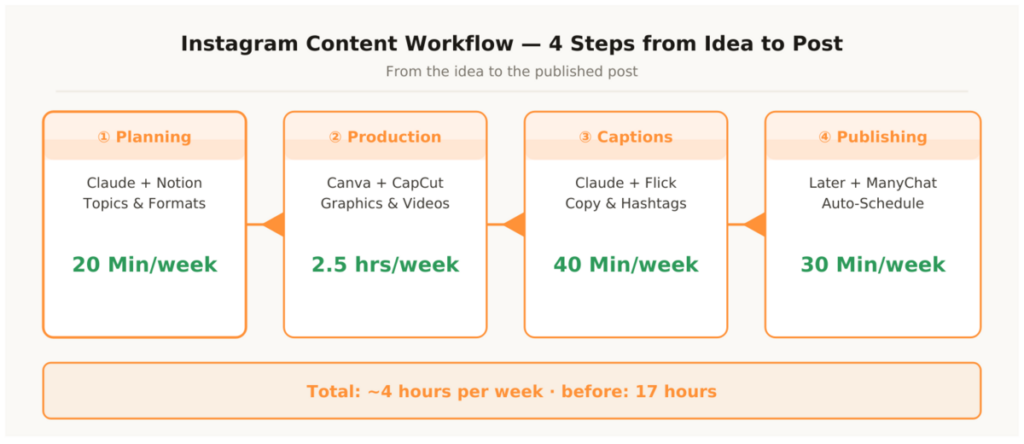
Plan all seven posts for the week in a single 45-minute session on Monday morning. Claude generates the topic plan and hooks, Flick delivers hashtag sets, Notion stores everything structured. The rest of the week is production and publishing — no more planning work. Anyone who runs this Monday ritual for two weeks consistently never goes back. The mental relief is enormous: you know exactly what to do every day — without having to decide from scratch each time.
Phase 02 – Accelerating Visual Production
Graphics and videos are the biggest time block in the Instagram workflow. A carousel with ten slides, plus a reel, plus two stories — that’s easily five to six hours per week when done manually. With the right system it halves to under 2.5 hours — without any compromise on quality. In fact, through templates and brand infrastructure the quality often becomes more consistent than with manual production.
The key isn’t the tool itself, but the template infrastructure. Anyone who has cleanly set up brand templates produces by duplicate-and-edit afterwards. The creative work reduces to swapping text and images — all design decisions have already been made. Colors, fonts, spacing, logos — defined once, never discussed again.
This sounds like a loss of creativity. In practice the opposite is true: anyone who doesn’t have to think about design questions every time has more mental capacity for what really counts — the content. Templates free creative energy, they don’t constrain it.
2.1 Building the Canva Pro Template Infrastructure
Five templates cover 90 percent of all posts: reel cover, carousel slide (master format plus all follow-up slides), story, quote post and announcement post. Create these five templates once as brand templates in Canva — set colors, fonts and logo once, never touch them again. Every new post is a copy with swapped content.
Canva Magic Studio accelerates production further: automatic resize to all formats (1:1, 9:16, 4:5) from a single master design, AI-powered background removal without Photoshop, and Bulk Create for series. With Bulk Create you upload a CSV table with 20 topics — Canva automatically generates 20 graphics with individual texts. This is particularly efficient for carousel series on related topics or monthly statistics posts where only the number changes.
An often overlooked advantage of Canva Pro is the Brand Kit function: all brand colors, fonts and logos are stored centrally. When you update your corporate design — new primary color, new font — you change it once in the Brand Kit and all future designs automatically adopt the change. No manual reworking of old templates.
2.2 Editing Reels with CapCut
CapCut reduces the editing effort for a 30-second reel from 40–45 minutes to under 12 minutes. Auto-captions with one click, AI-powered music synchronization, automatic cut suggestions based on audio rhythm — the majority of the technical work is done before you manually intervene. You review the result, adjust two or three cuts if needed, and you’re done.
The auto-caption function is particularly valuable: Instagram users scroll on average without sound. Captions aren’t optional — they’re essential for every reel. Typing them manually costs 10–15 minutes per reel. CapCut handles it in one click with over 90 percent accuracy — you only correct obvious errors.
Anyone with longer content — such as YouTube videos or podcast episodes — additionally uses Opus Clip. Opus Clip analyzes the entire video, identifies the most relevant segments based on engagement signals, independently cuts them to 60 seconds and adds subtitles and portrait-format reframing. From a single 20-minute video, three to five finished reel clips are produced without any manual editing. The only manual step: briefly review the generated clips and select the best two or three.
2.3 Batching as an Efficiency Multiplier
The decisive efficiency gain lies not in the individual tool but in the production principle: batching. Instead of editing a video or creating a graphic daily, you produce all reels and graphics for the week in one block once a week. Switching between creative tasks costs time and energy — cognitive scientists call this task-switching costs. Anyone editing four reels back to back is in the flow by the second and needs significantly less time for the remaining ones than for the first.
Concretely: every Wednesday, two hours of production. All graphics for the next week in Canva, all reels in CapCut. Then production is done for seven days. No daily warm-up, no daily setup, no daily context switch between creative and strategic thinking.
Batching works not just for videos and graphics but also for captions, hashtag sets and quality control. Anyone writing all seven captions for a week in one session stays in the content flow — the tone remains more consistent, the quality higher than with daily individual writing.
Phase 03 – Automating Captions and Hashtags
Writing copy is the second biggest time drain after visual production. Anyone posting daily and writing every caption from scratch loses three hours per week on a task that can be reduced to 40 minutes with a one-time setup. The misconception: many think AI-generated captions sound generic. That’s true — but only if the prompt is generic.
The foundation is a brand voice document. One page, no more: tone (direct, no BS, direct address), typical sentence structures, forbidden words (generic, promotional, clichéd), three example hooks and three example CTAs from your top posts. This document goes into every Claude prompt for captions — from that point the AI consistently sounds like you. The quality of the brand voice document determines the quality of all generated texts. Invest time here and get it back tenfold.
3.1 Caption System with Claude Templates
Four saved Claude prompt templates cover all formats: reel caption, carousel caption, story text and quote post. Each template contains the brand voice document as context, the format as an instruction and three to five examples from your top posts as reference. You save these templates once in Claude as your own projects or in Notion as a copy-paste template.
The process: take the topic from the Notion database, open the matching template, insert the topic, generate the caption, finalize personally in 2–3 minutes. Seven captions in one session — 40 minutes total. Anyone working this way for the first time is surprised how close the output already is to their own voice on the first draft. That’s because of the brand voice document. Without it every AI caption sounds the same.
The manual finalization isn’t a flaw in the system — it’s a deliberate part of it. The AI delivers 80 percent. The remaining 20 percent are personal anecdotes, current references, specific expertise that only you have. These 20 percent make the difference between a good post and a post that goes viral. And thanks to the AI first draft they now cost only 2–3 minutes instead of 20.
3.2 Hashtag Workflow from the Library
Hashtags come directly from the clusters set up in Flick. Three to five base clusters for the core topics of the niche — depending on the post topic, select the matching set, enter it in Notion, done. No research, no repetition, no copy-paste from old posts with unknown performance.
An important aspect many overlook: hashtag sets shouldn’t be repeated too frequently. Instagram recognizes when the same tags are always used and can reduce reach. With three to five clusters you rotate automatically — no manual tracking needed, since the clusters in Notion can be sorted by last-used date.
- Write brand voice document (tone, forbidden words, 3 example hooks, 3 example CTAs)
- Save four caption prompt templates in Claude (Reel, Carousel, Story, Quote)
- Create Flick account, build three hashtag clusters for core topics
- Extend Notion database with caption and hashtag columns
- First batch: generate and review seven captions in one session
- Set rotation rule: which cluster is used when
Phase 04 – Automating Scheduling and Publishing
Manual posting is the most pointless work in the entire Instagram workflow. Opening the app at the right time every day, inserting the caption, inserting the hashtags, uploading the image, posting — that’s five to eight minutes per post. With daily posting over seven days: almost an hour of time lost per week on pure click-work with zero creative value. Add the mental weight: the daily reminder, the interruption in the middle of the workday, the risk of missing the optimal posting time.
Later solves this completely. Connect with Instagram via Meta API, schedule posts in the feed planner, activate Auto-Publish — done. Later publishes automatically at the scheduled time, without confirmation, without manual app opening. The only manual step is the weekly scheduling — and with the finished captions and graphics from the previous phases that takes 25–30 minutes.
4.1 Setting Up Later and Planning the Week Ahead
Later Free is enough to get started — one account, 30 posts per month, Auto-Publish. The visual feed planner shows how the account looks visually before posts go live. That’s more than a nice-to-have: the visual consistency of the feed is a decisive factor for the first impression on new visitors. An unstructured feed costs followers — a visually consistent feed converts profile visitors into followers.
The concrete process: Wednesday evening after production, schedule all posts for the next week in Later. Apply posting times from Metricool, insert captions and hashtags from Notion, upload graphics. 25–30 minutes — and the next week runs automatically. No stress, no interruptions, no forgotten post.
For multiple accounts or more than 30 posts per month, the Later Starter Plan makes sense. Anyone also wanting to cover TikTok or Pinterest can connect Later with Repurpose.io — then a post automatically distributes to all platforms without any additional effort.
4.2 Analytics Review with Metricool
The weekly 20-minute review in Metricool closes the content loop: which posts delivered the best reach? Which formats are performing above average? When is the target audience active? Which hashtag clusters work better than others? Metricool answers these four questions in a single dashboard, without having to navigate manually through Instagram Insights.
The insights flow directly into the next Monday planning prompt for Claude. What worked well this week becomes the template for next week. What didn’t work gets adjusted. The workflow improves automatically week by week — not through gut feeling, but through data.
Phase 05 – Scaling Community Management
Community management is the hardest area to automate — and the one most often automated incorrectly. Anyone responding to comments with generic bot replies or automatically liking strangers’ posts loses engagement, trust and risks account bans. That’s not the goal of this system.
What can be automated without compromising authenticity: repetitive link redirects, standard DM requests for frequently asked questions, and comment-to-lead flows for content actions. These automations don’t replace real engagement — they free up time that you can then use for real engagement.
ManyChat is the standard for comment-to-DM automations and an official Meta Business Partner. No rule violation, no account risk. A single keyword trigger flow delivers immediate measurable value: anyone who writes “Comment GUIDE for the free download” in a reel post automatically triggers a DM with the promised content. This flow simultaneously increases comment engagement — a direct algorithm signal — and collects qualified leads directly into the DM inbox.
5.1 Setting Up the Basic ManyChat Flow
A single flow is enough to start: define the keyword, write the DM text, insert the link, activate the flow. This flow runs 24 hours, 7 days a week — without manual responses, without your involvement. The entire setup takes 30–45 minutes. The return is immediate: less manual DM work, more engagement signals for the algorithm, more leads from existing content.
Once the first flow works, further ones can be built: a flow for the most common question in your niche, a flow for product inquiries, a flow for collaboration requests. Each additional flow removes more repetitive DM work from your daily routine. This scales without proportionally costing more time — once built, every flow runs permanently.
5.2 Repurpose.io for Multi-Platform Distribution
Repurpose.io connects Instagram directly with TikTok, YouTube Shorts, Pinterest and LinkedIn. A reel uploaded once is automatically distributed across all connected platforms — with platform-specific descriptions that you store as templates once. One video, four platforms, zero manual effort after setup.
This is one of the biggest leverage points in the entire stack: you produce content once for Instagram — and simultaneously cover TikTok, YouTube Shorts and Pinterest. Reach multiplies, effort stays constant. Anyone wanting to be active on multiple platforms without multiple production efforts can’t avoid Repurpose.io.
ManyChat flows for standard requests are fully compliant with Meta’s rules. What violates Meta’s terms of service and risks account bans:
- Automated following and unfollowing of other accounts
- Automatic liking of other people’s posts at scale
- Buying engagement (followers, likes, comments)
- Spam comments via third-party tools
The Complete Tool Stack
This list is the current state of the production stack. Every tool was tested in real use over several months — no recommendations based on test accounts or affiliate interests. Cost, simplicity and time savings are personal experience values.
Content Strategy & Planning
1. Claude Pro
Weekly topic plan, hook variants and caption generation based on a brand voice document — in under 20 minutes. The AI core of the entire system. Cost: €20/month. Time savings: 3 hours per week. Setup: moderate. Bottom line: Indispensable — no scalable caption system without Claude.
2. Flick
Hashtag cluster management by reach, competition density and niche relevance. Set up three to five clusters once — then ten seconds per post instead of ten minutes of research. Cost: from €11/month. Time savings: 45–60 minutes per week. Setup: very easy. Bottom line: Biggest time savings per setup effort in the entire stack.
3. Notion
Central content hub: topic planning, caption archive, hashtag library and publishing status in one system. Connects all phases of the workflow. Cost: free. Time savings: 1 hour per week. Setup: very easy. Bottom line: Foundation of the entire production system.
Visual Production
4. Canva Pro
Brand templates, Bulk Create and Magic Resize from a single master design. Five templates cover 90 percent of all posts. Set up once, used permanently. Cost: approx. €13/month. Time savings: 3 hours per week. Setup: very easy. Bottom line: No scalable visual workflow without Canva Pro.
5. CapCut
Reel editing with auto-captions, AI music sync and automatic cut suggestions. Reduces editing a 30-second reel from 45 to under 12 minutes. Cost: free. Time savings: 2 hours per week. Setup: very easy. Bottom line: Free solution with professional output.
6. Opus Clip
AI clip extraction from long-form videos — analyzes, edits and adds subtitles. Only relevant if you regularly have longer videos to turn into reels. Cost: from €15/month. Time savings: 1.5 hours per week (long-form content only). Setup: very easy. Bottom line: Powerful for repurposing, unnecessary without long-form content.
Scheduling & Analytics
7. Later
Auto-publish with visual feed planner directly via Meta API. Posts automatically at the scheduled time without manual confirmation. Later Free is fully sufficient for one account. Cost: free / from €16/month. Time savings: 1 hour per week. Setup: very easy. Bottom line: The first tool everyone should set up immediately.
8. Metricool
Analytics dashboard, posting time optimization based on your own follower data and weekly performance review. 20 minutes per week — and you know exactly what works and what doesn’t. Cost: free / from €22/month. Time savings: 30 minutes per week. Setup: very easy. Bottom line: Closes the content loop between planning and optimization.
Community & Distribution
9. ManyChat
Comment-to-DM automations and lead flows as an official Meta Business Partner. One keyword trigger runs 24/7 — collects leads, boosts comment engagement, saves manual DM work. Cost: from €15/month. Time savings: 2 hours per week. Setup: moderate. Bottom line: Biggest lever for passive lead generation in the entire stack.
10. Repurpose.io
Automatic distribution to TikTok, YouTube Shorts, Pinterest and LinkedIn directly after the Instagram upload. One video — four platforms — zero manual effort after setup. Cost: from €19/month. Time savings: 1 hour per week. Setup: very easy. Bottom line: Essential as soon as you’re active on more than one platform.
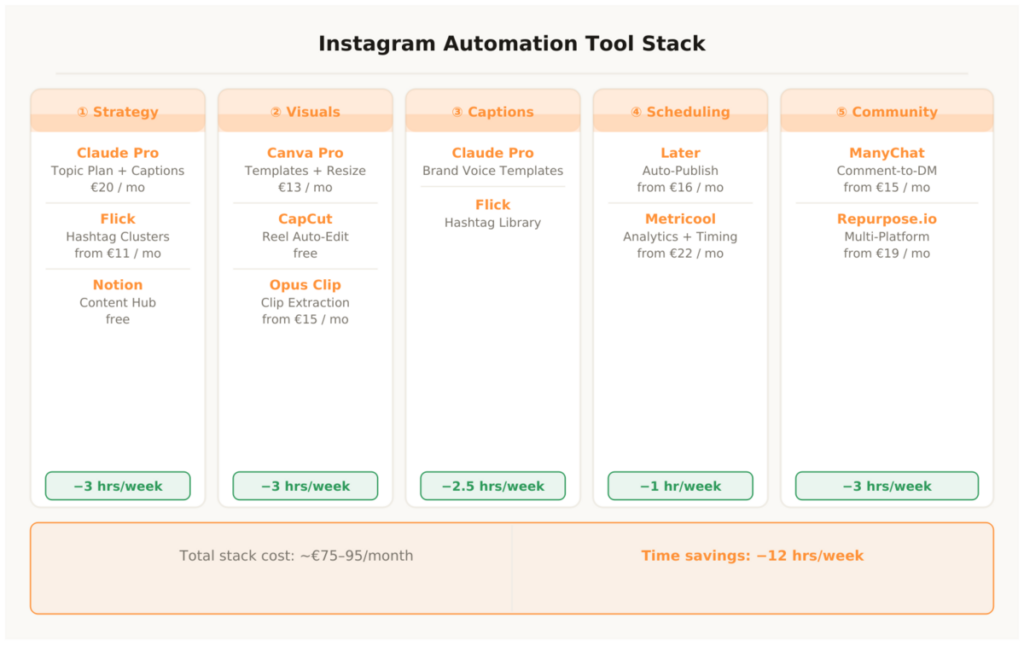
All tools together cost €75–95 per month — less than two hours of freelance work. At twelve hours saved per week and an hourly rate of €50, this pays for itself in the first two days of the first week.
Instagram Automation – The Most Important Questions
Is Instagram automation against the terms of service?
Scheduling tools like Later and Metricool are officially supported by Meta and don’t violate guidelines. AI support for copy is unproblematic. ManyChat is an official Meta Business Partner. What violates the guidelines: automated following and unfollowing, automatic liking of other people’s posts at scale, and buying engagement. None of these elements are part of the system described here. The line is clear: everything that simulates genuine human actions is prohibited. Everything that makes production and distribution more efficient is permitted.
How long does it take to build the system?
Realistically six to eight hours for the complete initial setup: creating Canva templates (1.5–2 hours), writing the brand voice document and Claude prompts (1 hour), setting up Later and Metricool (45 minutes), creating Flick clusters (45 minutes), setting up the basic ManyChat flow (1–1.5 hours), connecting Repurpose.io (30 minutes). Recommendation: staged rollout, one phase per week. This prevents overwhelm and allows each phase to be tested individually before the next one is added.
Does this work for small accounts under 1,000 followers?
Yes — and especially at this stage, consistency is the decisive lever. Anyone posting with a structured system from the start grows faster than someone with sporadic and inconsistent-quality content. The algorithm favors consistent accounts — regardless of the absolute follower count. Later Free, Canva Pro and Metricool Free make the entry possible for under €15/month. ManyChat and Flick can be left out in the first phase and added later.
What does the complete stack cost per month?
The entry configuration is €75–95/month: Claude Pro €20, Canva Pro €13, Later Free (€0) or Starter €16, Flick €11, ManyChat €15, optionally Repurpose.io €19 and Metricool €22. The minimum version — Claude Pro, Canva Pro, Later Free, Flick — costs €44/month and covers the most important time savings. The rest can be added step by step once the system is running.
Which tool should you set up first?
Later. Scheduling is the most immediate time saving without a learning curve. Anyone planning even three posts per week in advance saves the daily question “what do I post today?” and the manual app opening at the right time. Later Free is fully sufficient to start. The second tool should be Canva Pro — templates are the foundation for scalable visual content. Then Claude Pro for the caption system.
Can you automate Instagram completely without any creative work?
No — and that would be counterproductive. What can be automated: production, distribution, scheduling, hashtag research, template-based copy and community flows. What must remain manual: the creative direction decision, the content briefing for AI tools, personal responses to real engagement and spontaneous reactions to current trends. Accounts without a recognizable human voice behind them perform worse long-term — the algorithm and users notice the difference. The goal is not an account without a human behind it, but a human who uses their time for the decisions that really count. This is where marketing automation and authentic content creation work together — not against each other.
This article is updated regularly. Every time new tools are integrated into the workflow or existing tools are replaced, it flows directly in here.